

How to Choose a Round LCD Display: Resolution and Viewing Angles Explained
 2026-02-19
  00:00
00:00 

The Basics of Round LCD Displays
What Is a Round LCD Display and How Is It Different from Rectangular Displays?
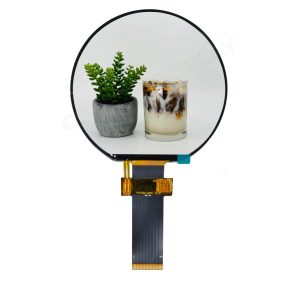
A round LCD display is a circular-shaped screen. It provides a unique visual form. This makes it perfect for uses where space and looks matter a lot. Unlike usual rectangular screens, round LCDs give better design options. They fit smoothly into circular setups like smartwatches, car instrument panels, or control knobs.
Because of their special shape, round displays usually need tailored parts. These include special driver boards, software support, and custom housings. –With customized LCD OD, LCD AA, FPC OD, backlight option. So, system designers must think about more than just the size. They also need to check electrical fit when adding round displays to their gadgets.
Common Applications of Round LCD Displays
Round LCD displays find use in many main areas:
- Wearable technology: Their small size and nice shape suit them well for smartwatches and fitness trackers.
- Industrial instruments: In control panels with tight space or where round dials are common, round screens boost ease of use and visual match.
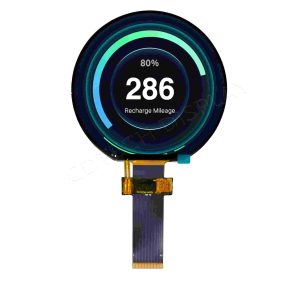
- Automotive systems: They appear more in dashboards, steering controls, and infotainment setups. There, style and purpose need to work together.
Why Resolution Matters When Choosing a Round LCD Display
What Does Resolution Mean in the Context of Round LCD Displays?
Resolution means the full number of pixels that make up an image on the screen. For round LCD displays, this is often given as the pixel count across the horizontal and vertical along the diameter — for example, 480×480 pixels. Greater resolution packs more pixels into the same area. As a result, images look sharper, and text appears clearer.
This matters a lot in gadgets with tiny screens like wearables or small industrial displays. Icons and data must stay easy to read with just a quick look.
How to Select the Right Resolution for Your Application Needs
Factors to Consider:
- Viewing distance: If people use the display very close — like on a smartwatch — then higher resolution is key to keep things clear.
- Interface capabilities: Ensure your built-in system or microcontroller handles the resolution you pick. Check fit with SPI, MIPI, or RGB interfaces early in the design.
- Power consumption: Greater resolution tends to need more processing power. It also raises backlight use, which boosts energy needs. This is vital for devices that run on batteries.
Viewing Angles Explained: How They Affect User Experience
Why Are Viewing Angles Important in Round LCD Displays?
Broad viewing angles make sure the screen stays readable and colors stay true from many sides. This is extra crucial in round LCD displays. Users might not always face the screen straight on. For example, in car dashboards or wearables at odd angles, steady visibility boosts ease of use and safety.
What Technologies Improve Viewing Angles in Round LCDs?
Key Technologies:
- IPS (In-Plane Switching): This top panel tech gives great color truth and broad viewing angles — usually up to 178° side to side and top to bottom. It keeps pictures sharp no matter where the viewer stands.
- Optical bonding: By sticking the touch layer right to the screen glass with no air spaces, optical bonding cuts down on inside reflections and shine. This boosts readability in different light setups. It also adds strength to the build.
Additional Key Specifications to Evaluate Before Purchase
What Other Technical Parameters Should You Review?
When picking a round LCD display, resolution and viewing angle are not the only details that count. You should look at other specs too:
Important Metrics Include:
- Brightness: Measured in nits, brightness sets how well the screen shows up in bright places. Outdoor uses often need displays with 800 nits or higher.
- Contrast ratio: This shows the gap between the deepest black and the brightest white the screen can show. Better contrast ratios improve clear sight in various light setups.
- Response time: This counts most for hands-on or video uses. Quicker response times give smoother changes and better touch replies.
How Does Touch Integration Work with Round LCDs?
Many round LCDs have built-in capacitive touch layers for easy user input. Capacitive touch allows multi-touch, quick response, and toughness. But you must check that your system’s software — like drivers and OS help — works with the touch controller in the display unit.
How to Match a Round LCD Display With Your Project Requirements
What Are the Steps to Determine Compatibility With Your System?
To make sure your round LCD display fits well into your project, think about these points:
Key Considerations:
- Interface type: Verify if your system handles usual display links like SPI, MIPI DSI, or RGB parallel.
- Operating temperature range: Pick a display built for the weather your product will meet. This is key for car or outside industrial uses.
- Mounting options: Round displays often need special frames or housings to mount right. Check mechanical fit at the start of design.
Highlighting CDTech’s 3.6″ Sunlight Readable IPS Display
What Makes CDTech’s 3.6″ IPS Round Display Suitable for Demanding Applications?
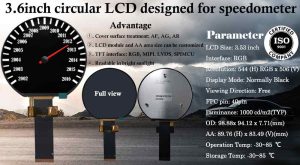
At CDTech, we provide a 3.6″ round IPS display module. We built it for tough settings. Our display uses a high-resolution setup of 480×480 pixels. This gives super-clear views even on a small circular screen.
This product uses IPS tech that offers very wide viewing angles — up to 178° both horizontally and vertically. So, it ensures top readability from any spot. With brightness over 800 nits, this display stays clear in direct sun. That fits it for outside tasks.
We offer an optional built-in capacitive touch layer too. It allows multi-touch handling without hurting screen sharpness or speed.
Which Applications Benefit Most From This CDTech Product?
Our 3.6″ round display works best for:
- Outdoor handheld devicesthat need clear sight in strong sunlight.
- Industrial control panels, where toughness and clear reading matter in changing surroundings.
- Wearable electronics, where small size, good looks, and features need to match up well.
FAQ
Q: What is the ideal resolution for a smartwatch round display?
A: A resolution of at least 320×320 is recommended for smartwatches to ensure text readability and crisp graphics on smaller screens.
Q: Are round LCD displays harder to integrate into embedded systems than rectangular ones?
A: They can be slightly more complex due to their unique shape requiring custom bezels or enclosures, but integration is manageable with proper interface support.
Q: Can round LCD displays be used in automotive environments?
A: Yes, provided they meet automotive-grade standards such as wide operating temperature ranges, high brightness levels, and durability against vibrations or UV exposure.
Post Search
Related Articles
-

Capacitive vs Resistive Touch Screen Car Stereo: Which Is Right for You?
-

TN LCD vs IPS LCD: How to Choose the Right Display for You
-

Capacitive Touch Panel or Resistive: Which Suits Your Needs?
-

Why Choose an IPS LCD Panel for Your Next Screen Purchase?
-

CDTECH to Showcase Cutting-Edge Display Solutions at SID 2025
-

Comparing Different Types of Displays in Cars: A Detailed Overview