LCD Pressure Damage: Causes, Pressure Spots on Screen & Prevention (2026 Guide)
 2026-05-07
  16:16
16:16 

If your screen shows white spots, bright patches, cloudy areas, or pressure marks that remain visible after cleaning, the LCD panel may already be suffering from internal pressure damage. This issue is commonly seen in laptops, industrial displays, medical devices, and portable electronics where continuous force, stacking pressure, vibration, or aggressive cleaning gradually deforms the LCD structure.
In most cases, LCD pressure damage is permanent because the internal liquid crystal alignment and cell gap structure have already been physically distorted.
White spots caused by pressure are a subset of LCD pressure damage. For broader causes, see our dedicated guide:
<White Spots on LCD Screen: Causes, Fixes & Industrial Solutions>
What Is LCD Pressure Damage?
LCD pressure damage occurs when external pressure distorts the microscopic spacing and liquid crystal alignment inside the display panel. Even small force disturbs light transmission and creates permanent visual defects.
Key effects:
· Liquid crystal misalignment
· Uneven light transmission
· Permanent visual artifacts (white spots, mura, pressure marks)
Quick Self-Test
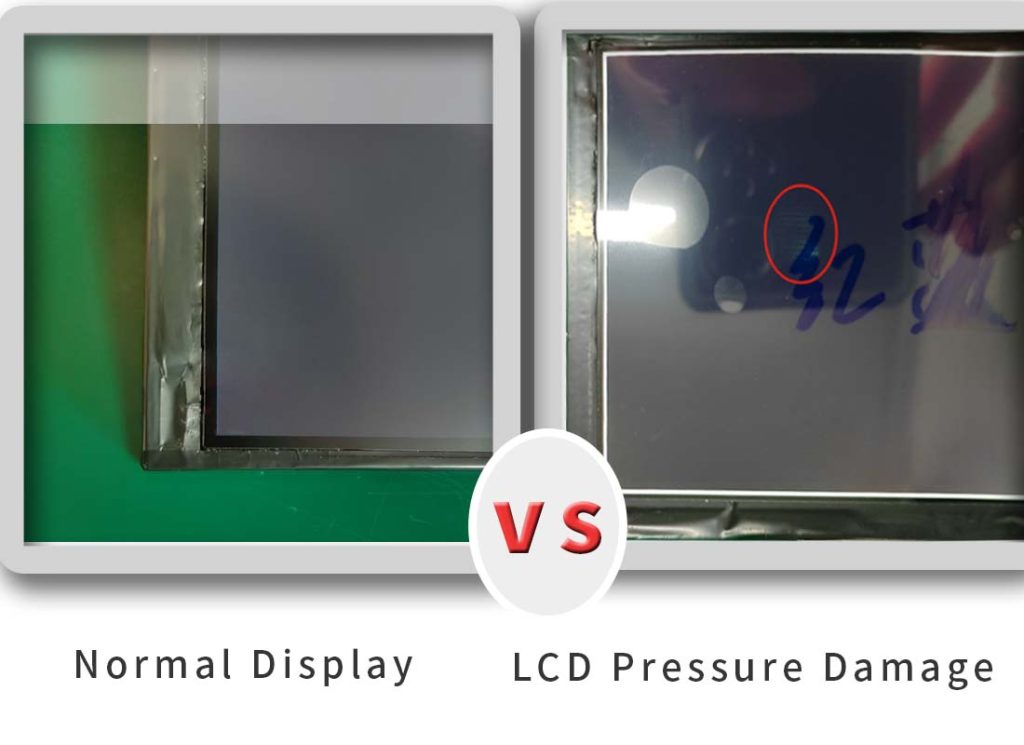
Comparison of a normal LCD and one affected by screen pressure marks
A normal LCD shows uniform brightness and no artifacts. A pressure-damaged LCD presents visible spots, uneven brightness, or permanent marks.
Typical Symptoms of LCD Pressure Damage:
- Screen pressure marks (localized bright or dark areas)
- Pressure marks on LCD monitors
- White spots on LCD screens
- Bright spots on LCD displays
- Dark patches or shadow areas
- Mura effect (uneven brightness)
- Cloudy or bruised display appearance
LCD Pressure Damage vs Other Screen Issues
Many users initially mistake LCD pressure damage for dirt, dead pixels, or screen bubbles because the visual symptoms can look very similar.
|
Issue |
Cause |
Fixable |
Visual Sign |
|
Dirt / smudge |
Surface contamination |
Yes |
Changes after cleaning |
|
Dead pixel |
Pixel failure |
No |
Tiny fixed dot |
|
Pressure damage |
Internal deformation |
Mostly No (minor cases may fade) |
Screen pressure marks / spots |
|
LCD Bubble |
Delamination / air gap |
Rarely |
Circular or spreading |
How to Diagnose LCD Pressure Damage (Quick Test)
A simple way to identify pressure damage is to compare whether the affected area changes after cleaning or screen movement.
Clean the screen and lightly press near the affected area, then observe:
|
Observation |
Meaning |
|
Color spreads |
Liquid crystal affected |
|
No change |
Likely permanent damage |
|
Partial recovery |
Minor deformation |
Final Verdict: If cleaning does not change the appearance, it is internal LCD pressure damage. LCD pressure damage is usually permanent.
|
Supplement: 1)VA panelsshow pressure marks more easily than IPS or TN panels due to their higher stress sensitivity and liquid crystal alignment characteristics. 2)Higher temperatures may temporarily reduce visibility but do not repair damage. |
Why LCD Pressure Damage Is Usually Permanent?
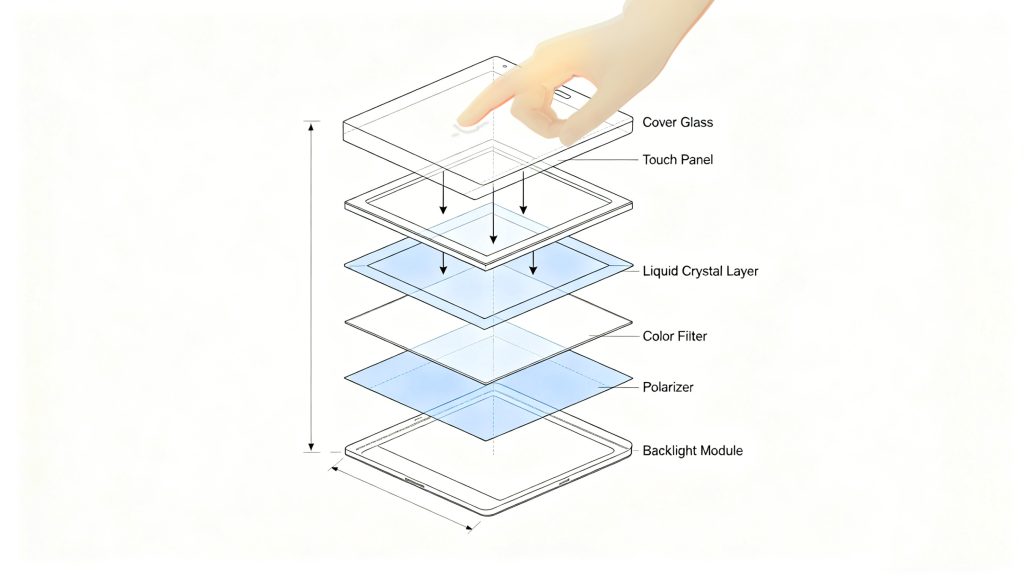
A typical TFT LCD has a cell gap of only 3–5μm between two glass layers.
When pressure is applied:
- Glass and polarizer deform slightly
- Cell gap becomes uneven
- Liquid crystal alignment is permanently disrupted
- Light scatters unevenly, forming visible defects
DIY repairs (heat, pressing, vacuum tools) often worsen damage and cannot restore the cell gap structure.
Pressure Spots That Appear Days Later
Minor internal deformation is initially invisible. Repeated thermal cycling, vibration, or continuous stress enlarges the damaged area over time. Common in vehicle-mounted displays, outdoor kiosks, industrial HMIs, and medical handheld devices.
Real-World Examples of LCD Pressure Damage
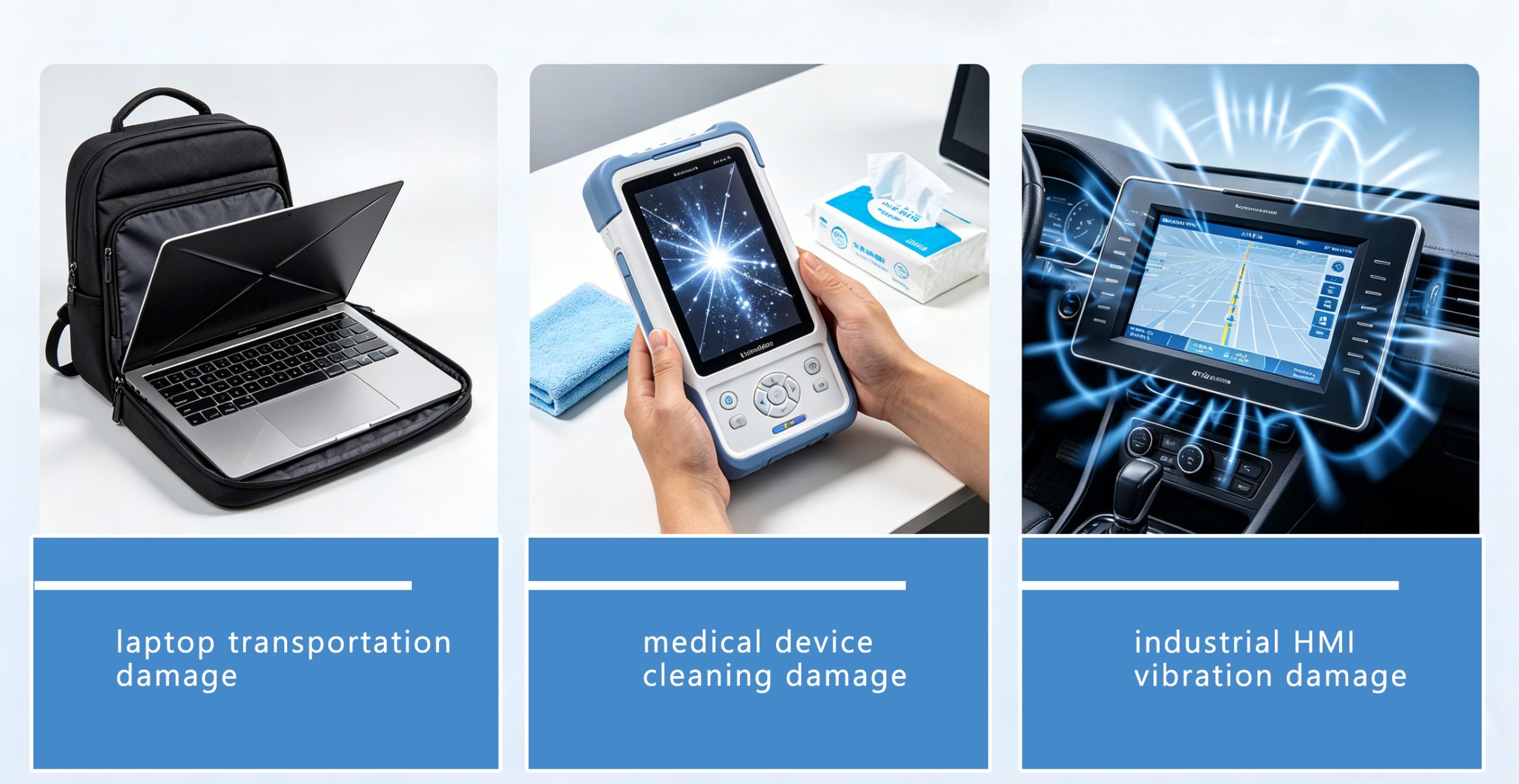
- Laptop Transportation Damage
A common example is laptop keyboard pressure during transportation. When a laptop is packed tightly inside a backpack, continuous compression between the keyboard and LCD panel can gradually create permanent pressure marks on the screen.
- Medical Device Cleaning Damage
In hospitals, handheld medical devices are cleaned multiple times daily using disinfectant wipes. Over time, repeated wiping pressure may slowly deform the LCD structure and create bright spots or mura effects.
- Industrial HMI Vibration Damage
Vehicle-mounted industrial HMIs often experience constant vibration and thermal cycling. Even without direct impact, long-term stress can eventually lead to internal LCD deformation.
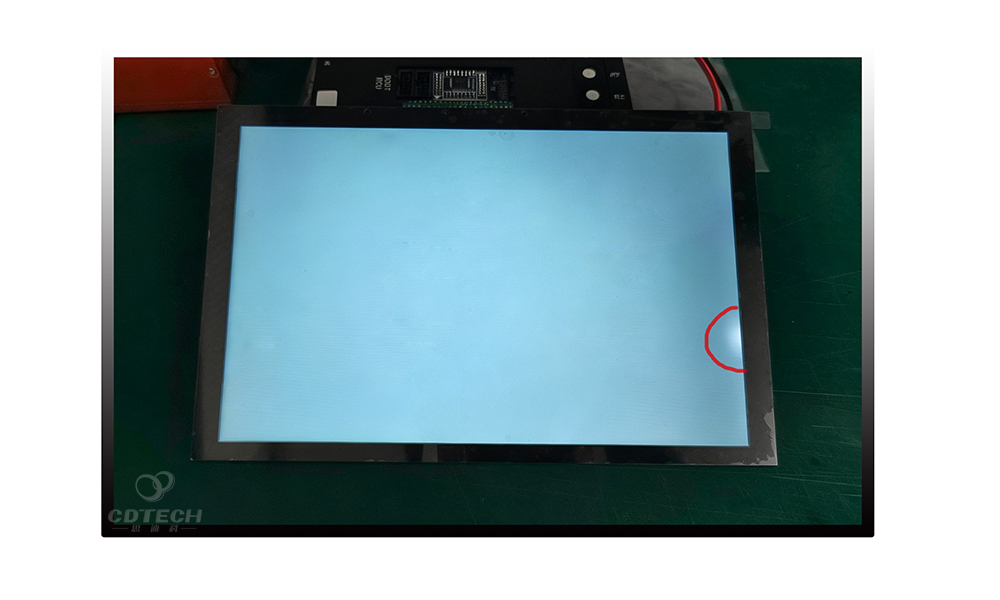
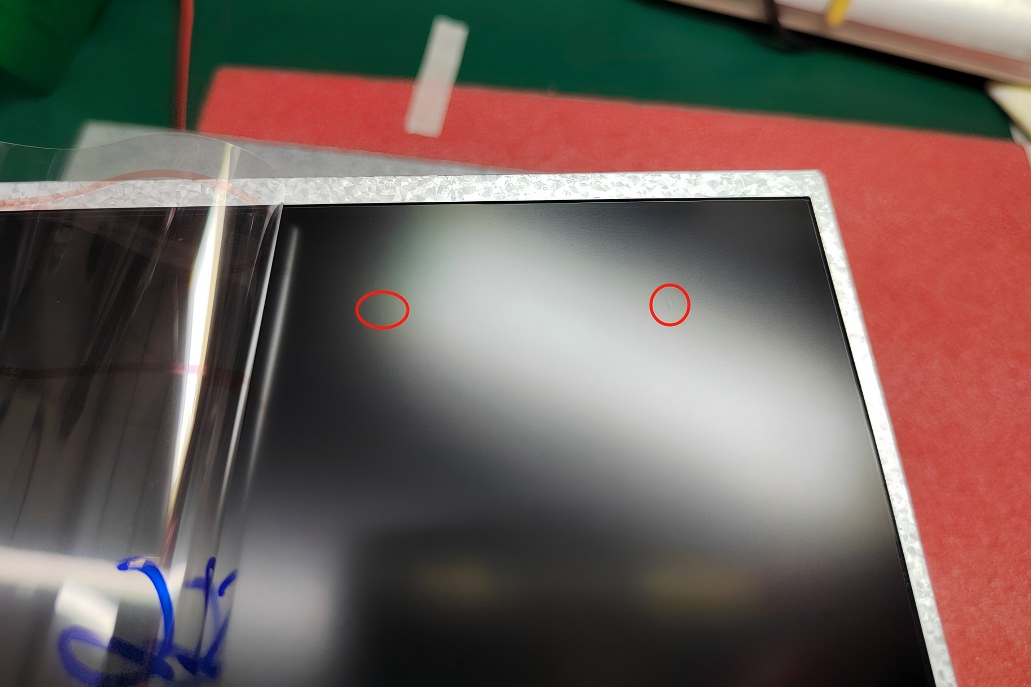
- Factory Case: Pressure Marks on a 10.1-Inch Automotive Display Caused by Packaging Compression
During quality analysis of a 10.1-inch automotive display module, a localized pressure mark was identified on the upper polarizer surface. Investigation confirmed that excessive compression from tray packaging during transportation generated concentrated mechanical stress on the polarizer layer, resulting in a visible pressure defect.
To eliminate the issue, additional cushioning material was added above the display surface, and the packaging structure was redesigned to distribute mechanical load more evenly during shipment. Enhanced inspection procedures were also implemented to improve defect detection before delivery.
Following these corrective actions, no similar pressure-mark defects were observed in subsequent production batches. This case highlights the importance of packaging design and mechanical protection for automotive displays, which are often exposed to vibration, transportation stress, and demanding operating environments.
Looking for automotive display solutions? Explore our high-brightness automotive TFT LCD modules designed for transportation and vehicle applications.
What Causes Pressure Spots on Screen?
These issues often appear as pressure spots on screen, especially in high-stress environments.
1. External Force & Impacts
Finger pressure, drops, or sharp objects can create localized stress points.
2. Over-Pressure Cleaning (Hidden High-Frequency Cause)
Yes, cleaning can cause pressure damage to LCD.
This is one of the most underestimated causes in real-world applications.
Repeated wiping with force—especially in medical or industrial environments—gradually deforms internal layers.
Safe cleaning rules:
- Use microfiber cloth
- 70% isopropyl alcohol (IPA)
- Gentle linear motions
- Minimal pressure
(Do not spray the liquid directly onto the screen. Instead, spray it onto the cloth first)
3. Transportation & Storage Pressure (B2B Critical Factor)
Stacking, poor packaging, and uneven load distribution create long-term compression. Unlike impact, this type of stress is continuous and often invisible at delivery.
Practical guidelines:
- Ensure uniform load distribution.
- Standard LCD packaging: not stacked more than 5 layers high.
- Displays 10.1″ and larger: vertical palleting recommendedto eliminate vertical gravitational compression.small sizes can be handled flexibly.
4. Environmental Stress
Temperature cycling, mechanical vibration, and thermal expansion/contraction amplify stress and accelerate pressure-related failures.
Can Pressure Spots on LCD Screens Go Away?
In minor cases, pressure spots may become less visible after several hours or days if the LCD layers recover slightly from temporary stress.However, permanent pressure damage usually does not disappear because the liquid crystal alignment and cell gap structure have already been physically deformed.
If the spot remains visible after cleaning and restarting the display, the damage is typically irreversible.
Can LCD Pressure Damage Be Fixed?Repair vs. Replacement Guide
1. Minor damage: May fade slightly over 1–7 days under stable temperature and no stress, but rarely fully recovers.
2. Moderate / severe damage: Permanent; requires full panel replacement.
3. DIY repairs: Extremely low success rate—no reliable home fix exists.
4. Temporary improvement: Warmth may soften appearance but defects return when cooled.
5. Professional repair: Polarizer replacement or panel-level refurbishment may restore some minor cases, but replacement is usually recommended for severe LCD pressure damage.
Consumer : For severe LCD pressure damage, panel replacement is usually the most reliable solution.
Pressure spots caused by mechanical extrusion usually indicate permanent panel damage, unlike LCD screen bleeding , which is mainly related to backlight structure and light leakage issues.
In most cases, pressure damage inside an LCD panel cannot be repaired because the liquid crystal layer, polarizer, or internal structure has been permanently affected.
Minor surface pressure marks may become less visible over time if the LCD layers are not permanently damaged. However, visible pressure spots, bright areas, or dark patches usually indicate internal panel damage and may require LCD panel replacement.
How to Prevent LCD Pressure Damage (CDTech Engineering Solutions)
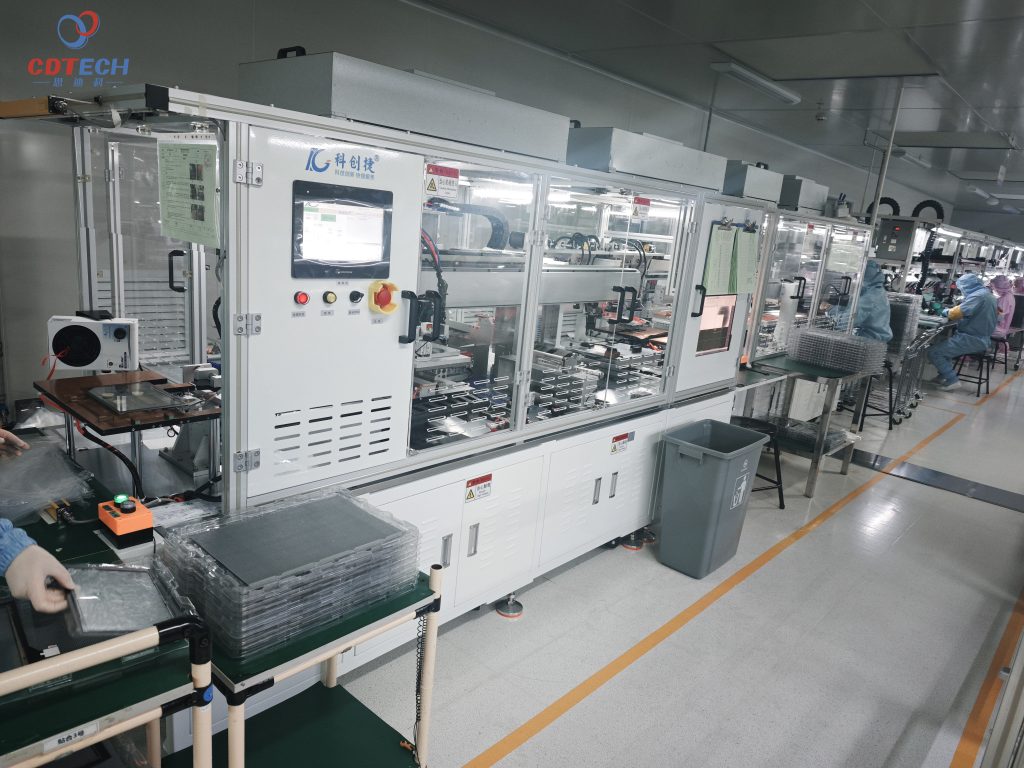
For industrial and medical applications, prevention is critical.
1. Optical Bonding Technology(OCA/LOCA)
Eliminates internal air gaps, distributes pressure evenly, and reduces stress concentration (most effective solution).
2. Gasket & Bezel Stress Control
Custom gaskets absorb shock and prevent over-compression during assembly.
3. Strengthened Cover Glass
Chemically or physically strengthened glass improves mechanical resistance and reduces bending under load.
- Recommended thickness: ≥0.7mmfor industrial/medical use.
- IK10 requires ≥1.1mm or 2.0mmchemically strengthened glass.
4. Surface Treatments (AG / AR / Anti-Shatter)
Surface coatings help distribute localized pressure while boosting durability, anti-glare performance, and outdoor readability.
5. Structural Reinforcement
Metal backplates, reinforced frames, and support ribs increase module rigidity to prevent bending and deformation under pressure or vibration.
6. Reliability Testing
Validate performance with pressure testing, drop testing, thermal cycling, and long-term wipe simulation to catch design weaknesses before mass production.
7. IK Impact Protection Design
To match the impact risk of different environments, CDTech offers displays with graded IK impact protection ratings:
|
IK Rating |
Protective Capability (Impact Energy) |
Typical Application Scenarios |
|
IK06–IK07 |
Basic Protection (Resists 1–2 joules) |
Controlled Indoor Environments: Light factory automation equipment, laboratory instruments, indoor control panels, office devices. Where risk is limited to minor accidental bumps. |
|
IK08 |
Medium Protection (Resists 5 joules) |
Semi-Public / Indoor-Outdoor Areas: Self-service kiosks, vending machines, industrial touch monitors in warehouses, equipment subject to occasional knocks. |
|
IK09 |
High Protection (Resists 10 joules) |
High-Traffic Public Environments: Electric Vehicle (EV) charging stations, public ATMs, transportation ticketing terminals, hospital information screens. Withstands higher accidental impact or rough use. |
|
IK10 |
Highest Vandal-Proof Protection (Resists 20 joules) |
Unattended or High-Risk Areas: Outdoor industrial HMIs, vandal-proof public kiosks, construction site equipment, correctional facility devices. Essential where deliberate vandalism or severe accidental impact is a concern. |
Why Pressure Damage Matters in Industrial & Medical Displays
Pressure damage directly impacts reliability, readability, and lifespan.
- Medical devices: Distorted displays risk diagnostic errors and patient safety.
- Industrial displays: Reduced outdoor readability, higher maintenance costs, unplanned downtime.
- Laptops & handhelds: Early failure, poor user experience, pressure spots on laptop screen.
For industrial LCD monitors used in factories, transportation systems, and control rooms, display defects may gradually develop due to vibration, improper mounting stress, or long-term mechanical loading. Once visible pressure marks appear, readability and operational reliability can be significantly affected, especially in mission-critical applications.
Cost Insight:
- Medical/industrial downtime: $200–$5,000 per hour.
- Prevention is often 10× cheaper than replacement.
Scenario-Based Solution Matrix
|
Application Scenario |
Primary Stress Source |
Recommended Engineering Solution |
|
Medical Handhelds |
High-frequency wiping; touch pressure |
Full Optical Bonding + ≥0.7mm strengthened glass |
|
Outdoor Kiosks |
Vandalism; thermal expansion stress |
1.1mm+ strengthened glass + IK09–IK10 rated |
|
Industrial Vehicles |
Constant vibration; mechanical shock |
Custom shock-absorbing gaskets + IK08+ |
|
Large-Screen HMI |
Static stacking pressure |
Vertical storage + full bonding + IK08 rated |
Also Check:
Is High-Pressure Vacuum-Thermal Bonding the Fix for LCD Pressure Damage?
Is full OCA lamination essential for autonomous cockpit displays?
Is Advanced LOCA the Answer to Pressure Marks on Curved Displays?
Is Over-Pressure Cleaning Causing LCD Failures in Medical Handhelds?
Is IK10 the right choice for vandal-proof outdoor displays?
If your application involves frequent cleaning, vibration, or outdoor exposure, early mechanical design decisions can significantly reduce long-term LCD failure rates.
Our engineering team can help evaluate:
- optical bonding requirements
- cover glass thickness
- IK protection targets
- bezel stress risks
- transportation reliability
Talk to our engineers for a custom solution within 24 hours.
People Also Ask: LCD Pressure Damage
Q: Is LCD pressure damage permanent?
A: Most cases are permanent due to plastic deformation of the cell gap. Minor cases may fade but not fully recover.
Q: Can pressure spots spread?
A: No, but temperature changes may temporarily affect their appearance.
Q: Can pressure damage happen without impact?
A: Yes. Long-term static pressure (stacking, squeezing) is a leading cause of hidden damage.
Q: What is the best way to clean an LCD screen?
A: Use microfiber cloth + 70% IPA, gentle linear motions, no pressing.
Q: How to prevent pressure damage in devices?
A: Use bonded displays, reinforced structures, and proper packaging.
Q: How to fix pressure spots on laptop screen?
A: No reliable DIY fix exists. Replacement is the standard solution.
Q: Can pressing on an LCD screen cause permanent damage?
A: Yes, especially on panels without optical bonding or reinforcement. VA panels are most sensitive.
Q: Can keyboard marks damage a laptop screen permanently?
A: Yes. Continuous keyboard pressure against the LCD panel can permanently deform the liquid crystal structure, especially during transportation or backpack compression.
Q: Why do pressure spots become more visible on white backgrounds?
A: Uneven liquid crystal alignment changes how backlight passes through the LCD, making defects easier to see on bright or white images.
Q: Can screen cleaning cause pressure damage?
A: Yes. Repeated wiping with excessive force may gradually deform internal LCD layers, especially on displays without optical bonding.
Conclusion
Pressure spots, white patches, and screen bruising are signs of permanent internal LCD deformation, not surface contamination. Consumer devices typically require panel replacement. Industrial and medical displays can greatly reduce risk with CDTech’s optical bonding, strengthened glass, and reinforced mechanical design.