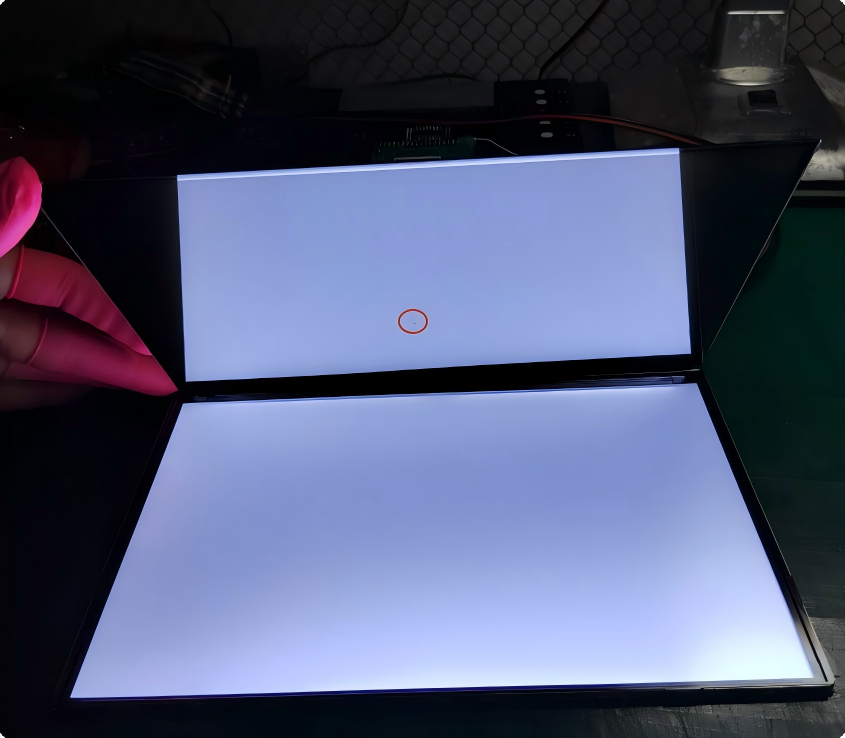
Dead Pixel vs Black Spot on LCD Screen How to Tell the Difference
 2026-09-08
  10:30
10:30 

A dark mark on an LCD screen does not always indicate the same type of defect. It may be a dead pixel, a stuck sub-pixel, pressure-induced Mura, a backlight issue, or damage to the LCD cell.
For engineers, system integrators, and equipment manufacturers, identifying the actual cause is important because the appropriate corrective action depends on the defect mechanism.
The key distinction is simple: a dead pixel is typically a pixel- or sub-pixel-level defect, while a black spot is a larger visual symptom that can have several different causes.
This guide explains how to distinguish a dead pixel from a black spot, identify common causes, test the display, and determine whether mechanical adjustment, repair, or LCD replacement is appropriate.
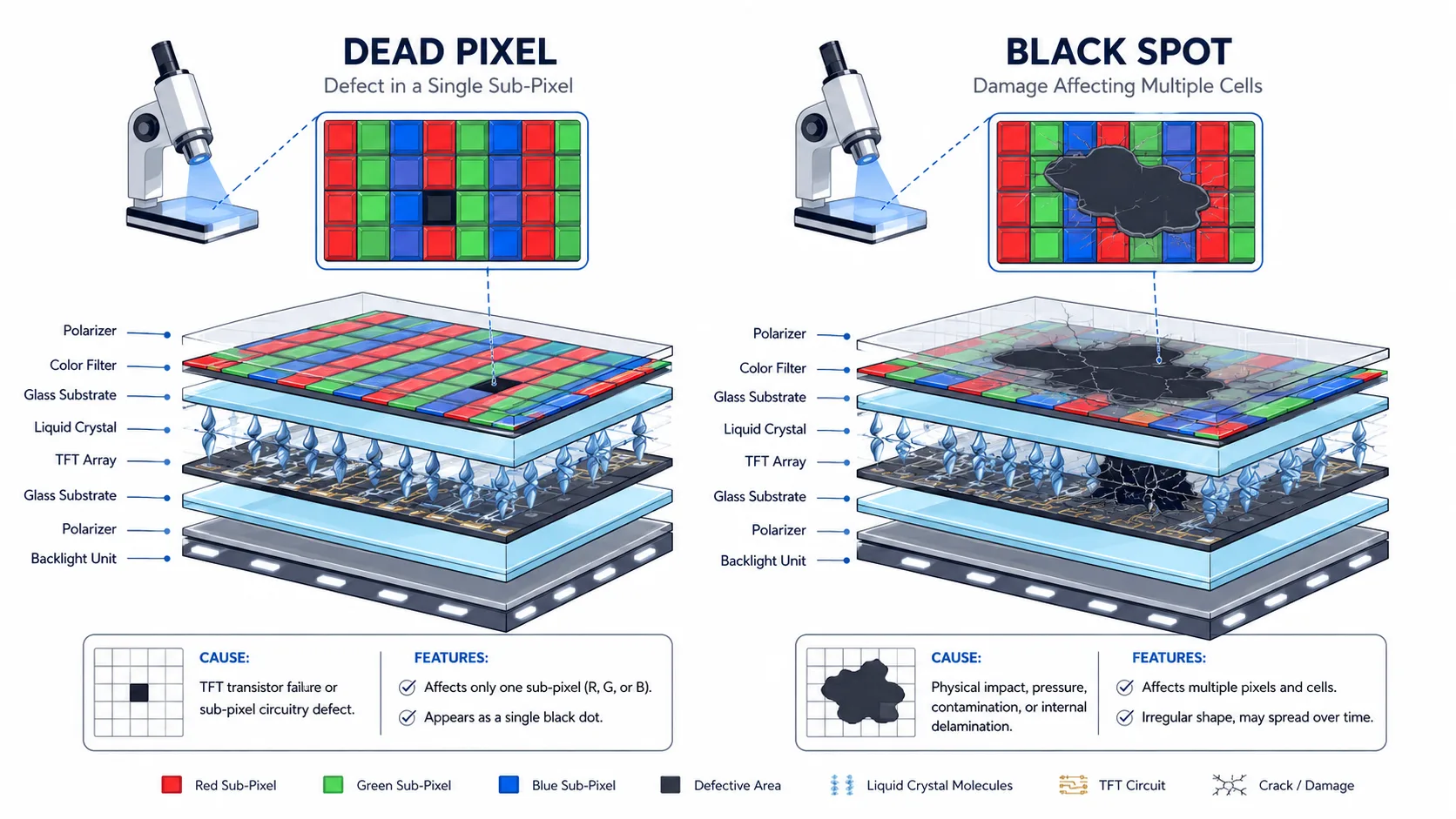
Dead Pixel vs Black Spot: Quick Comparison
|
Feature |
Dead Pixel |
Black Spot / Dark Area |
|
Typical appearance |
Tiny, sharply defined dark point |
Larger or irregular dark, grey, or shadow-like area |
|
Typical size |
One pixel or sub-pixel |
May cover multiple pixels |
|
Pixel-grid alignment |
Usually aligned with the pixel structure |
May cross multiple pixel boundaries |
|
Common causes |
Pixel/sub-pixel or TFT-related defect |
Pressure-induced Mura, backlight/optical damage, contamination, or LCD cell damage |
|
White background |
Small dark point |
Irregular dark or non-uniform area |
|
RGB test |
May reveal a specific pixel or sub-pixel defect |
Often remains visible as a localized non-uniform area |
|
Spreading |
Normally does not physically spread |
Depends on the cause; cell damage or leakage may expand |
|
Repairability |
Generally not repairable at panel level |
Depends on the root cause and module construction |
Important: “Black spot” describes a visual symptom rather than one specific failure mechanism. A dark area should therefore be diagnosed before assuming that the LCD panel itself is defective.
What Is a Dead Pixel on an LCD Display?
A dead pixel is a pixel or sub-pixel that permanently fails to produce its intended optical response.
A TFT LCD pixel consists of red, green, and blue sub-pixels. The TFT array and associated electrodes control the liquid crystal response of each sub-pixel, regulating how much backlight passes through the display.
When a pixel or sub-pixel becomes permanently inactive, it may appear as a small dark point, particularly against a white or other bright background.
A useful characteristic of a dead pixel is its small, precisely defined appearance. Because it is associated with the pixel structure, its position normally remains fixed.
Dead Pixel vs Stuck Pixel
Dead pixels and stuck pixels are related but should not be treated as exactly the same defect.
- Dead or dark pixel/sub-pixel: remains inactive and appears dark when it should produce light.
- Stuck or bright pixel/sub-pixel: remains fixed in a particular optical state and may appear continuously red, green, blue, white, or another fixed value.
Solid-color test patterns can help distinguish these conditions.
What Causes Dead Pixels and Black Spots?
Common Causes of Dead Pixels
Dead or dark pixel defects can result from several manufacturing or electrical conditions:
- TFT or electrode defects: Defects in microscopic TFT structures or pixel electrodes can prevent an individual pixel or sub-pixel from responding correctly.
- Manufacturing contamination: Particles or process variations during panel fabrication can affect microscopic pixel structures.
- ESD or electrical damage: Electrostatic discharge or electrical overstress during manufacturing, assembly, or handling can damage sensitive display circuitry.
- Driver or signal-line problems: If an entire row, column, or larger group of pixels is affected, the problem may involve a driver connection, signal line, FPC, or related circuit rather than a single pixel.
Common Causes of Black Spots
A black spot can originate from different parts of the display module.
Pressure-Induced Mura
Excessive mechanical pressure during display integration can cause localized luminance non-uniformity, commonly referred to as Mura.
Potential causes include:
- Excessive bezel or screw torque
- Incorrect gasket compression
- Insufficient clearance around the LCD
- Uneven enclosure tolerances
- Localized pressure on the glass
Pressure-induced Mura may appear as a grey, dark, or shadow-like area. If the appearance changes when mechanical stress is carefully reduced, the mounting design should be investigated.
LCD Cell Damage or Leakage
Physical impact, bending, excessive mechanical stress, or other damage can compromise the LCD cell structure.
If the cell or seal is damaged, liquid crystal leakage or structural damage may create an irregular dark area. Unlike a conventional dead pixel, this type of defect may change or expand over time.
Backlight or Optical-Layer Damage
A dark area may also originate from the backlight or optical stack rather than the TFT panel.
Possible causes include LED failure, light guide plate damage, diffuser or optical-film damage, or localized optical deformation.
Contamination or Moisture
Dust, particles, or moisture affecting sensitive optical areas can reduce display uniformity and create localized dark areas.
How to Diagnose a Dead Pixel vs Black Spot
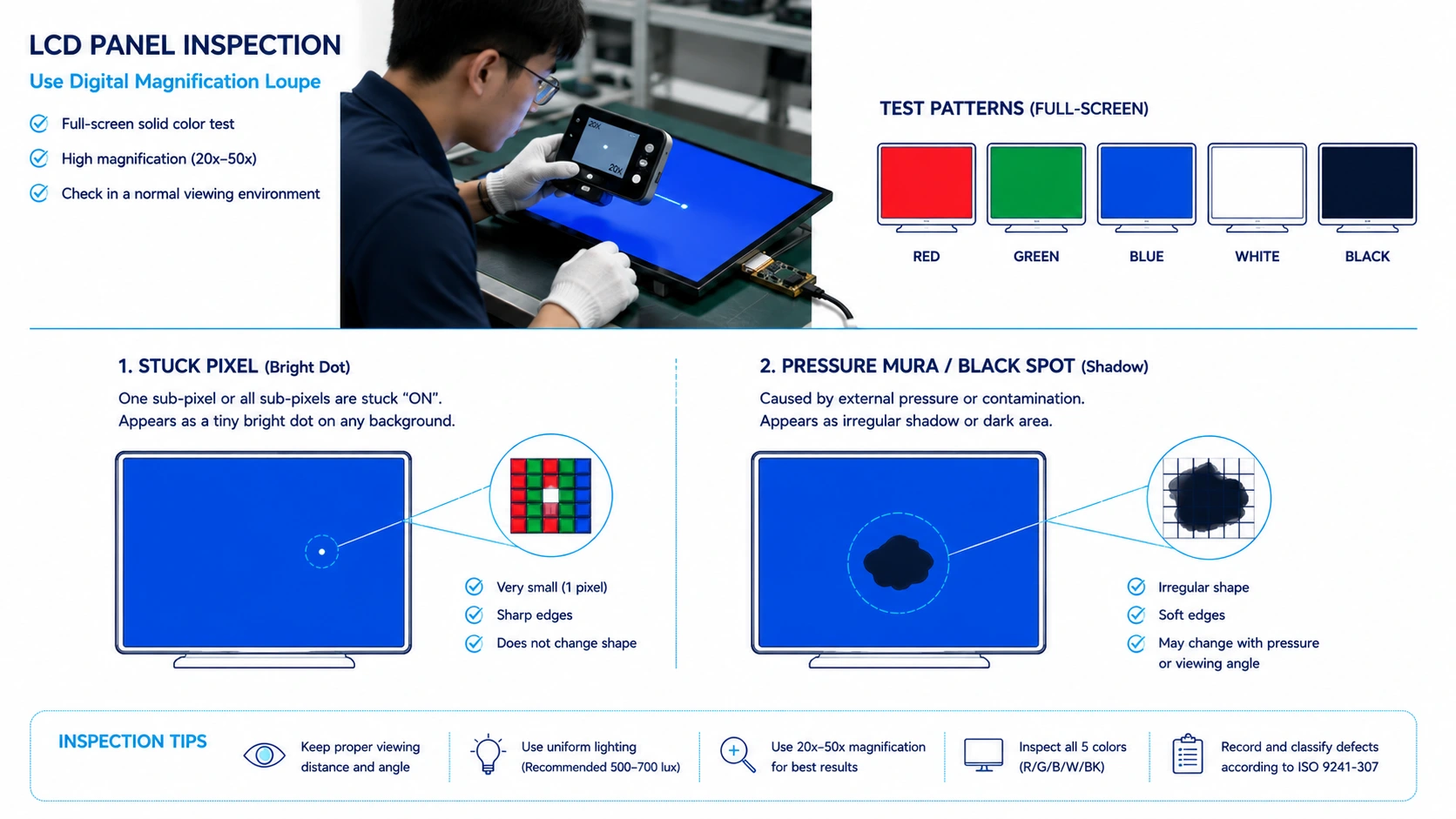
Before replacing an LCD module or submitting an RMA, engineers can perform several basic diagnostic checks.
1. Run a Solid-Color Display Test
Display full-screen:
White → Red → Green → Blue → Black
Each background provides different information.
White: Useful for identifying dark pixels, dark sub-pixels, and small dark spots.
Black: Useful for identifying bright or stuck pixels and sub-pixels.
Red, green, and blue: Useful for identifying individual sub-pixel defects and determining whether a defect is associated with a particular color channel.
A pixel-level defect normally remains at the same screen position throughout the test.
2. Check the Size and Shape
A defect that is:
- Extremely small
- Pixel-sized
- Sharp-edged
- Precisely aligned with the pixel grid
is more consistent with a pixel or sub-pixel defect.
A defect that is:
- Larger than an individual pixel
- Irregular in shape
- Soft or diffuse around the edges
- Crossing multiple pixel boundaries
is more likely to be associated with an optical, mechanical, or structural issue.
3. Inspect Under Magnification
An optical magnifier or digital microscope can help distinguish a pixel-level defect from a larger-area defect.
A pixel defect generally follows the display’s pixel structure, while optical or structural defects may have irregular boundaries or luminance transitions across multiple pixels.
4. Check Mechanical Stress
If the dark area appeared after the LCD was installed into an enclosure, inspect:
- Screw torque
- Bezel pressure
- Gasket compression
- Mounting flatness
- Clearance around the glass
- Localized contact points
If the appearance changes when mechanical stress is carefully reduced, pressure-induced Mura may be a possible cause.
Do not apply excessive direct pressure to the LCD glass during testing, as additional force can permanently damage the panel.
5. Monitor the Defect Over Time
A conventional pixel defect normally remains fixed at the same pixel location.
A dark area associated with LCD cell damage or leakage may change or expand over time.
However, not every black spot spreads. Mura, backlight defects, and some contamination-related problems may remain localized.
Therefore, spreading behavior should be considered one diagnostic indicator rather than a definitive test.
Dead Pixel vs Black Spot: Diagnostic Reference
Use the following observations as a quick engineering reference:
|
Observation |
Possible Interpretation |
|
Tiny, sharp, pixel-sized dark point |
Dead/dark pixel or sub-pixel defect |
|
Fixed red, green, or blue point |
Stuck/bright sub-pixel |
|
Irregular dark area larger than a pixel |
Black spot or optical/structural defect |
|
Defect follows the pixel grid |
More consistent with pixel-level failure |
|
Defect crosses multiple pixel boundaries |
More likely an optical or structural issue |
|
Appearance changes after mounting pressure is released |
Possible pressure-induced Mura |
|
Dark area follows the backlight structure |
Possible backlight or optical-layer issue |
|
Dark area changes or expands over time |
Possible LCD cell damage or leakage |
This approach helps separate pixel-level defects from module-level optical or structural problems before deciding whether replacement is necessary.
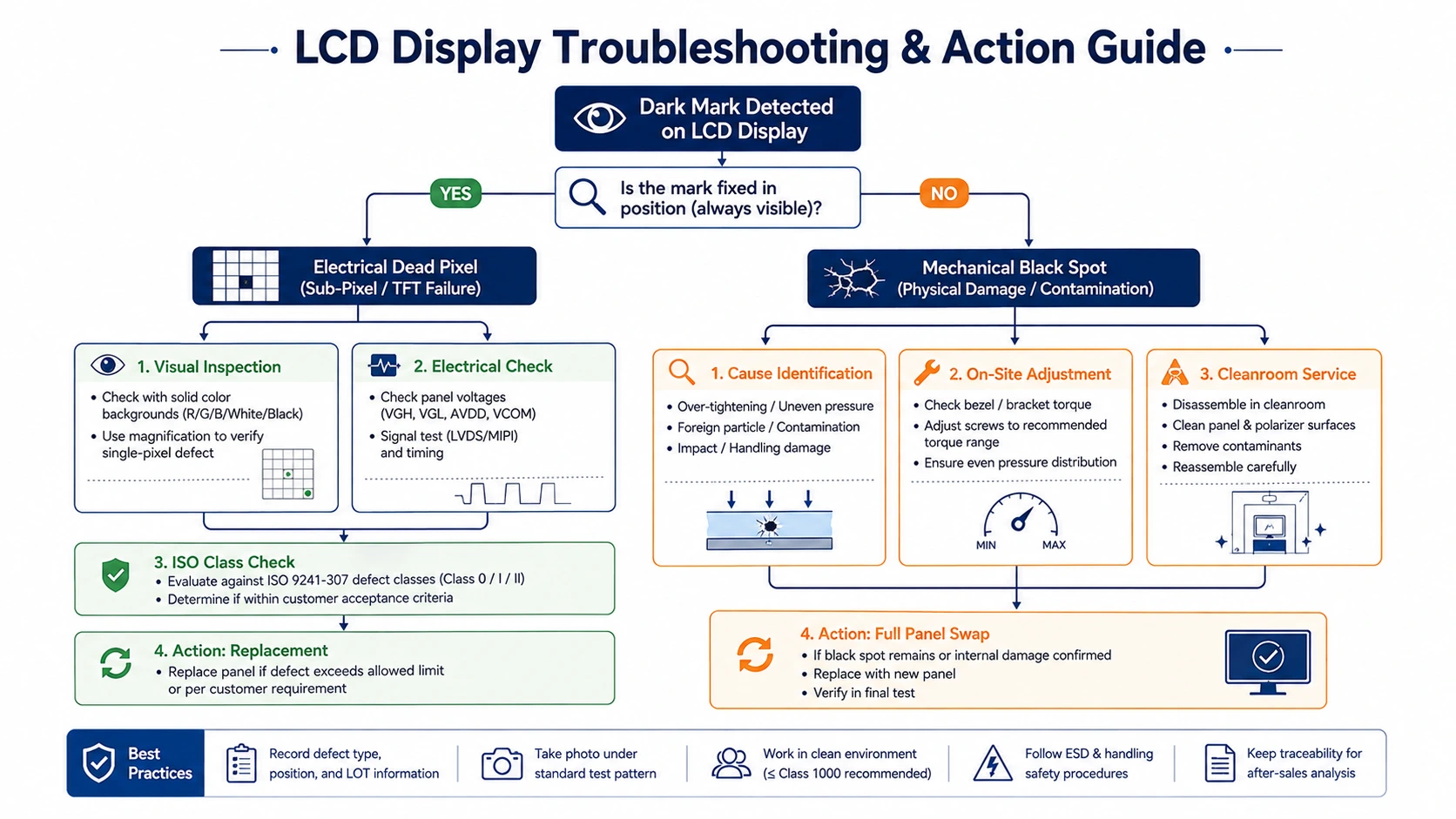
Pixel Defect Standards and Quality Acceptance
Pixel defects should be evaluated according to applicable display standards, manufacturer specifications, and customer quality requirements.
ISO 9241-307 provides methods for evaluating electronic visual displays, including approaches related to pixel defects. However, acceptable defect limits should not be assumed solely from the application category.
Actual acceptance criteria may depend on:
- Display size and resolution
- Manufacturer specifications
- Customer quality agreements
- Inspection conditions
- Required visual quality
- Project-specific acceptance criteria
For industrial, automotive, medical, and other quality-sensitive applications, pixel-defect requirements should ideally be defined during product specification and validation.
A single pixel defect does not automatically mean that an LCD module is unacceptable. The result should be evaluated against the agreed quality specification.
Can a Dead Pixel or Black Spot Be Repaired?
The appropriate solution depends on the failure mechanism.
Dead Pixel
A true pixel-level defect within the TFT glass is generally not repairable at field-service level.
If the defect exceeds the agreed project specification, LCD panel or module replacement may be required.
Pressure-Induced Mura
If a dark area is caused by mechanical stress rather than permanent cell damage, corrective action may include:
- Reviewing mounting torque
- Adjusting gasket compression
- Increasing mechanical clearance
- Correcting enclosure tolerances
- Improving mounting flatness
Correcting the mechanical design can be more effective than repeatedly replacing LCD modules.
Backlight or Optical Defects
Some backlight or optical-layer problems may be serviceable depending on the module construction and manufacturing process.
LCD Cell Damage
If the LCD cell has been structurally damaged or leakage has occurred, panel or module replacement is generally the practical solution.
How to Prevent LCD Black Spots and Pixel Defects
Prevention should begin during display design and system integration.
Key practices include:
- Control mounting pressure: Avoid excessive bezel pressure, uneven clamping, and excessive screw torque.
- Validate the display in the final enclosure: Check the assembled system for pressure-induced Mura and localized stress.
- Handle the display carefully: Protect TFT panels and glass substrates from impact, bending, ESD, and localized mechanical stress.
- Control assembly cleanliness: Appropriate manufacturing and handling conditions can reduce contamination-related defects.
- Define pixel quality requirements early: Establish pixel-defect acceptance criteria before prototype validation and mass production.
Controlled Manufacturing Environment
Display quality begins with controlled manufacturing processes. Cleanroom-controlled production environments help reduce particulate contamination during LCD assembly and handling, supporting consistent optical quality and display reliability.
For OEM applications, display validation should consider both the LCD module itself and the mechanical environment in which it will operate.
When Should You Replace an LCD Display?
LCD replacement is generally appropriate when:
- The LCD cell or glass has been permanently damaged
- Liquid crystal leakage is confirmed
- A black spot results from irreversible panel damage
- Pixel defects exceed the agreed acceptance criteria
- A backlight or optical problem cannot be practically repaired
- The display no longer meets the project’s optical or functional requirements
However, replacement should not automatically be the first response to every dark mark.
A better approach is:
Identify the symptom → determine the root cause → evaluate against the specification → correct or repair where practical → replace when necessary.
This can reduce unnecessary replacement costs and help prevent recurring display failures.
Frequently Asked Questions
Q: What is the difference between a dead pixel and a black spot?
A: A dead pixel is typically a very small pixel- or sub-pixel-level defect that remains fixed at a specific location. A black spot is a larger dark or non-uniform area that may result from pressure-induced Mura, backlight problems, contamination, or LCD cell damage.
Q: Can a dead pixel spread?
A: A conventional dead pixel normally does not physically spread because it is a localized pixel-level defect. If the affected area becomes larger, the underlying cause should be investigated.
Q: Can a black spot on an LCD screen get bigger?
A: It depends on the cause. LCD cell damage or leakage may expand over time, while pressure-induced Mura and some backlight defects may remain localized.
Q: How do I test for dead pixels?
A: Display full-screen white, red, green, blue, and black test patterns. Look for small fixed dark or bright points and compare their behavior across different backgrounds.
Q: Can pressure cause black spots on an LCD?
A: Yes. Excessive mechanical pressure from a bezel, screw, gasket, or enclosure can cause localized luminance non-uniformity known as pressure-induced Mura.
Q: Can a dead pixel be repaired?
A: A true pixel-level defect within the TFT glass is generally not repairable in the field. If it does not meet the project’s agreed quality requirements, panel or module replacement may be necessary.
Need Help Diagnosing an LCD Display Defect?
Correctly distinguishing a dead pixel from a black spot can help engineers avoid unnecessary LCD replacement and identify problems in the display, backlight, mechanical enclosure, or assembly process.
For OEM and system-integration projects, CDTech can support display requirements including:
- Pixel-defect specifications
- LCD panel selection
- Brightness and optical performance
- Touch integration
- OCA or full lamination
- AG, AR, and AF surface treatments
- Mechanical integration
- Operating-temperature requirements
- Display interfaces
- Customized TFT LCD structures
If you are evaluating a dead pixel, black spot, Mura, or other LCD display defect, CDTech can help identify the likely root cause and evaluate the appropriate display or integration solution.
Contact CDTech’s engineering teamto discuss LCD defect analysis, replacement options, or a customized TFT LCD display solution.