Why Does LCD Yellowing Occur Over Time? Causes, Mechanisms, Testing & Industrial Solutions
 2026-07-14
  10:48
10:48 

Introduction
In the display industry, LCD yellowing is a common long-term reliability issue where optical materials inside the display structure gradually degrade, causing visible color shifts such as yellow tint or screen discoloration.
While consumer users may search for quick fixes when a display develops a yellow tint, engineers managing industrial kiosks, medical monitors, or automotive dashboards need to identify the underlying material degradation and reliability risks.
 What Is LCD Yellowing?
LCD yellowing refers to a color shift in the display where white or neutral colors gradually appear yellow, brownish, or warm-toned.
It is not a software issue in most cases but a physical degradation of optical layers inside the LCD panel.
Typical symptoms include:
- White background appears yellowish
- Uneven color temperature across screen
- Yellow tint display on edges or center
- Screen looks warm compared to new panels
This issue is also commonly described as screen yellowing or screen discoloration, depending on the application and user terminology.
Why Does LCD Yellowing Happen? (Engineering Mechanism)
LCD yellowing is usually the result of aging across multiple optical layers, including polarizers, color filters, adhesives, and backlight components.
Polarizer Aging
The polarizer film inside LCD panels gradually degrades under:
- Heat exposure
- UV radiation
- Long-term electrical stress
This leads to reduced light polarization efficiency and color shift toward yellow.
Color Filter Degradation
Prolonged exposure to heat, UV radiation, and oxygen can gradually degrade the polymer binder within RGB color filters. As blue light transmission decreases over time, the display may begin to exhibit a noticeable yellow tint.
Adhesive & Optical Bonding Aging
Optical adhesives used in LCD lamination may:
- Oxidize under heat
- Yellow over time
- Lose transparency
This causes uniform yellow tint display effects.
Backlight Aging (LED / CCFL)
Backlight systems also contribute:
- LED phosphor degradation reduces blue spectrum output
- CCFL backlights (older systems) yellow significantly faster
Thermal Stress (Industrial Key Factor)
High temperature environments accelerate all above processes.
Especially in:
- Automotive dashboards
- Industrial HMI systems
- Outdoor kiosks
Elevated operating temperatures can accelerate the aging processes of optical materials within an LCD module.
Localized heat sources, such as processors, power components, or driver IC areas, may create uneven thermal stress and increase the risk of color non-uniformity. For industrial applications requiring continuous operation, effective thermal management is essential to maintain long-term display stability.
Environmental Humidity & Mechanical Expansion
For displays operating in volatile outdoor settings, ambient conditions act as secondary catalysts. Temperature fluctuations and high-humidity environments can create mechanical stress between glass substrates, optical films, and adhesive layers. Over long periods, these environmental factors may accelerate adhesive aging, reduce optical transparency, and contribute to uneven yellow discoloration.
Device-Specific LCD Yellowing Behavior
While consumer users may search for laptop screen yellow tint issues or temporary yellow display problems, these cases are different from industrial LCD reliability concerns, these consumer-grade anomalies are inherently different from severe industrial degradations. Consumer hardware compromises thermal density for ultra-thin profiles.
In contrast, industrial and automotive LCDs operate under a continuous 24/7 regime or extreme cabin temperatures. Standard consumer panels used in these demanding environments may experience faster color deviation due to limited thermal design and material stability. Industrial LCD modules are designed with more robust optical materials and thermal management to maintain consistent image performance over long-term operation.
Severe color shift may reduce visual accuracy and affect operator experience in applications requiring long-term monitoring, such as industrial control systems and medical equipment.
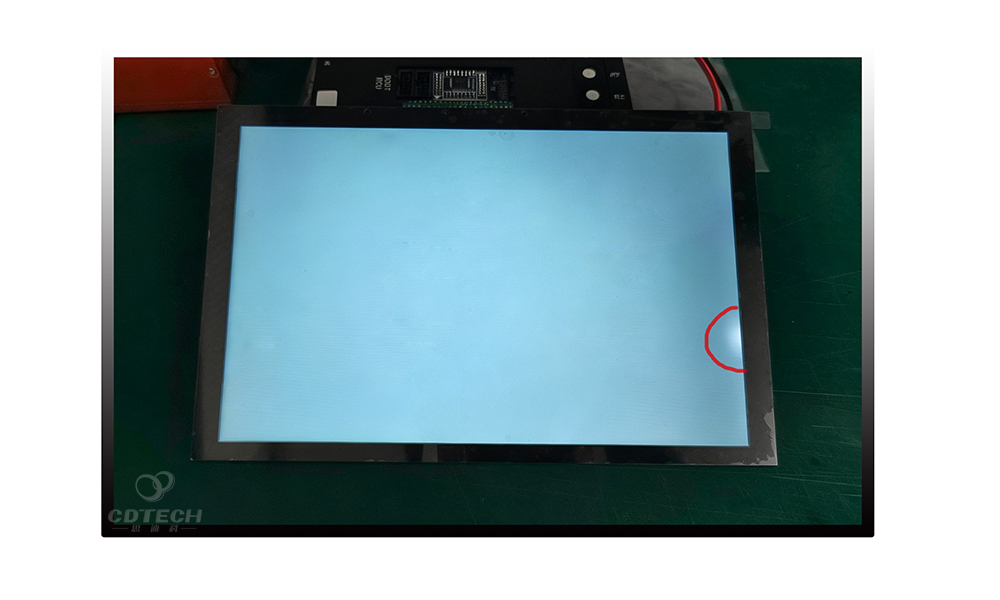
Figure 1: A customer uses a CDTech-supplied testing fixture to inspect 10.1-inch automotive display modules, identifying a subtle corner yellowing anomaly during quality verification.
As demonstrated in this field case (Figure 1), managing chromaticity drift in automotive displays requires effective diagnostics throughout the manufacturing and integration process. In demanding applications such as vehicle center consoles, even minor color shifts near display borders may affect visual consistency and product quality requirements.
To help customers reduce display-related quality risks, CDTech provides not only display hardware but also customized validation and inspection support, including specialized testing fixtures for incoming quality control (IQC). These capabilities help identify potential optical degradation or border discoloration earlier in the production process, before final system integration.
Consumer LCD vs Industrial LCD for Yellowing Resistance
|
Feature / Component |
Consumer-Grade LCD |
CDTech Industrial-Grade LCD |
|
Polarizer Type |
Standard iodine-based polarizer for general applications |
High-durability polarizer designed for extended temperature operation (up to 85°C) |
|
Optical Bonding |
Standard OCA solutions for general applications |
Industrial-grade OCR/OCA with enhanced optical stability and UV resistance |
|
Backlight Lifespan |
~20,000 Hours (Faster phosphor decay) |
50,000+ Hours (Premium LEDs with minimal color shift) |
|
Thermal Mitigation |
Standard thermal design for controlled operating environments |
Optimized thermal structures with aluminum heat sinks for improved heat dissipation |
How to Diagnose LCD Yellowing?
LCD yellowing (or screen discoloration / yellow tint display) can be diagnosed through a structured inspection process to determine whether the issue originates from the LCD panel, optical layers, or adhesive materials.
Accurate diagnosis is essential because not every yellowish screen is caused by panel aging. Software settings, display calibration, or optical bonding materials may produce similar symptoms. A systematic inspection process helps identify the actual root cause.
- The #FFFFFF Pure White Test: Display a solid white image at 100% brightness. If the yellowish tint remains across a large portion of the screen area, it may indicate material degradation within the optical layers of the LCD module. Unlike localized display defects such as backlight bleeding, LCD yellowing usually affects overall color balance across a wider viewing area.
- The Thermal Recovery Analysis: Shut down the display completely for 48 hours to allow the internal stack to cool down. If the yellow tint remains after the display returns to normal operating conditions, the issue is more likely related to permanent material aging rather than temporary thermal effects.
- The 395nm UV Stress Test: For advanced inspection, laboratory analysis may include UV aging tests and material evaluation to determine whether optical adhesives or polymer layers have experienced irreversible degradation.
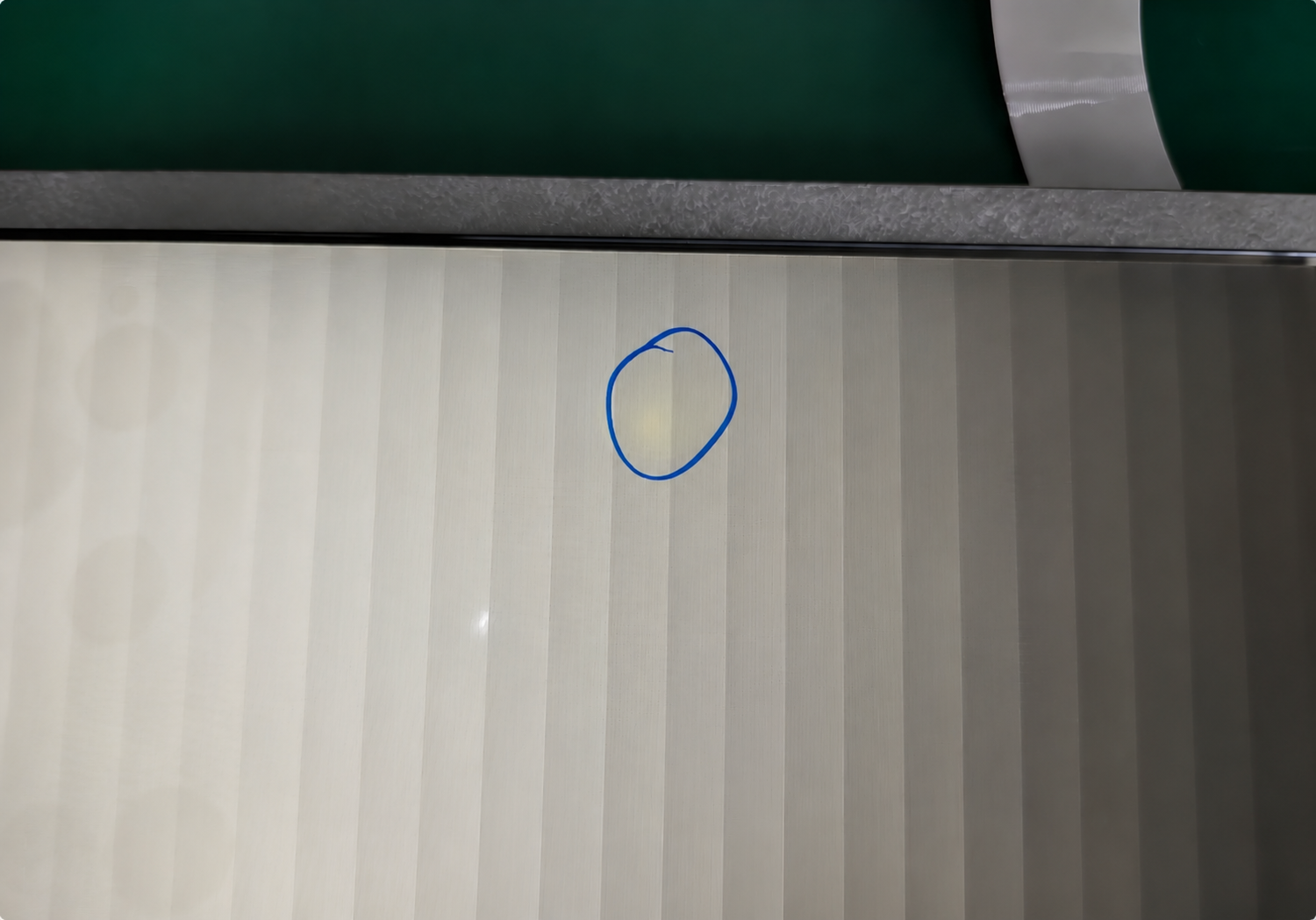
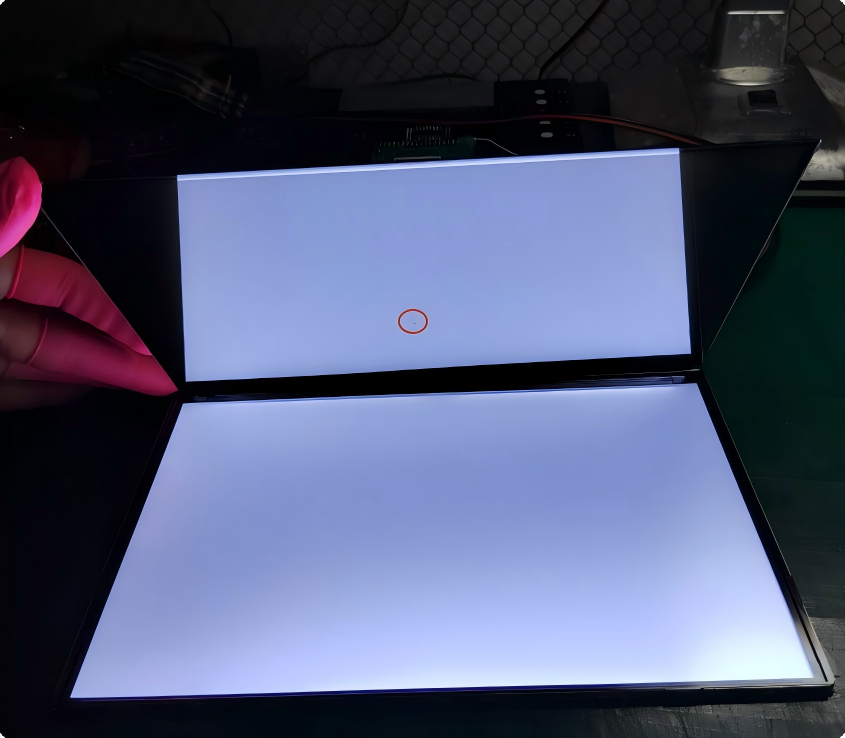
Figure 2: A real-world LCD yellowing defect sample identified during display quality analysis, showing a subtle localized yellow spot on the screen.
As shown in this real-world case (Figure 2), early-stage LCD yellowing can be visually subtle and difficult to detect under normal viewing conditions. It may not appear as a clearly defined defect; instead, the color shift can remain unnoticed during regular operation and become visible under pure white or low-gray scale test patterns. This highlights the importance of rigorous display inspection methods for industrial-grade display verification.
Failure Verification Summary
To confirm the root cause of LCD yellowing, a structured disassembly and isolation process was performed:
- LCM module inspection confirmed no intrinsic panel defect
- TP and LCM separation ruled out touch-related interference
- Optical layer isolation identified no cover glass abnormality
- Final analysis confirmed OCA/SCA adhesive aging as the key factor causing localized yellowing
Conclusion: The verification process indicates that the yellowing originates from optical bonding material degradation rather than intrinsic LCD panel failure, providing a more accurate basis for corrective action.
Can LCD Yellowing Be Fixed?
In most cases, LCD yellowing is not reversible, because it is caused by physical material aging.
Temporary mitigation (software level):
- Adjust color temperature
- Reset display profile
- Reduce brightness
Permanent solution:
- Replace LCD panel or module
When Should the LCD Be Replaced?
LCD replacement is generally recommended when yellowing significantly affects color accuracy, user experience, or application reliability. In industrial equipment, medical devices, and automotive displays, replacement is often more cost-effective than repeated calibration or temporary software adjustments.
How to Prevent LCD Yellowing?
To reduce the risk of LCD yellowing:
- Optimize brightness settings according to operating conditions
- Minimize prolonged exposure to excessive heat and UV radiation
- Use UV-resistant optical materials when required
- Ensure proper thermal management in display system design
- Select LCD modules designed for long-term reliability in demanding environments
Preventive strategies focus on reducing exposure to major aging factors and selecting display solutions with stable optical performance for long-term operation.
Industrial LCD Advantage (CDTech Perspective)
Industrial LCD modules are designed with enhanced material selection and structural optimization to improve long-term color stability under demanding operating conditions.
Polarizer Stability Enhancement
Polarizer films are one of the key components affecting LCD color stability.
Industrial LCDs use:
- High-durability polarizer materials with improved UV resistance
- Enhanced thermal stability to reduce chromatic drift
- Reduced degradation rate under continuous backlight exposure
This helps maintain consistent color performance during long-term operation.
Optical Bonding (OCA / OCR) Improvement
Optical bonding materials play an important role in long-term display stability.
Industrial LCD solutions typically use:
- UV-resistant OCA materials
- Improved bonding uniformity
- Improved resistance to yellowing during long-term reliability testing
This improves optical stability and reduces color shift during extended operation.
Backlight System Optimization
Backlight aging directly affects perceived screen yellowing.
Industrial solutions include:
- Long-life LED backlight systems (50,000–70,000 hours)
- Controlled wavelength distribution for stable color temperature
- Improved blue-light stability during long-term operation
These designs help maintain consistent brightness and color performance throughout the display lifetime.
Thermal Management Design
Effective thermal management is essential for maintaining display stability in continuous-operation environments.
Industrial LCD modules are designed with:
- Improved heat dissipation structure
- Aluminum backplate or thermal conductive materials
- Wide-temperature operation (-20°C to +70°C or higher)
These designs help reduce temperature-related color instability during long-term operation.
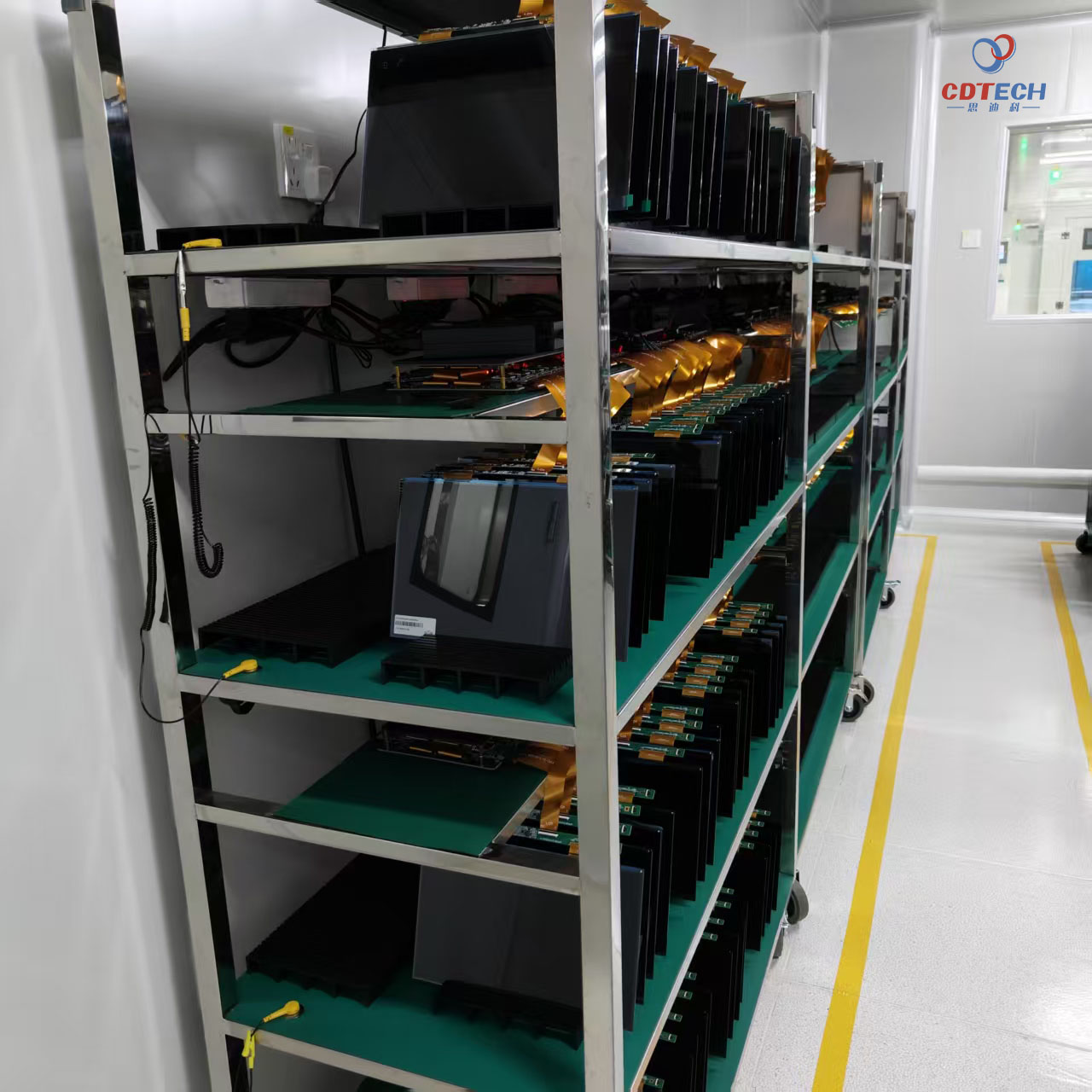
Figure 3: Inside CDTech’s controlled reliability laboratory, industrial TFT-LCD panels undergo high-temperature static and dynamic aging (burn-in) tests under ESD-controlled and dust-controlled conditions.
At CDTech, reducing the risk of LCD yellowing and color instability requires more than high-quality materials—it also requires rigorous batch validation. Before shipment, production batches undergo thermal aging evaluation in controlled burn-in facilities under defined operating conditions.
By running LCD panels through high-temperature aging tests, this reliability screening process helps identify potential instability in optical layers, polarizers, liquid crystal cells, and adhesives that may contribute to long-term color shift. This approach helps improve the long-term chromaticity stability of display modules used in demanding industrial applications.
Why Industrial LCDs Age More Slowly
Compared with consumer displays, industrial LCD modules are designed with higher-grade optical materials, more robust thermal management, and stricter reliability standards. These improvements significantly reduce the likelihood of premature LCD yellowing in demanding environments.
FAQ
What causes LCD yellowing?
LCD yellowing is mainly caused by aging of polarizers, optical adhesives, color filters, and backlight components. Long-term exposure to heat, UV radiation, and environmental stress can accelerate these material changes.
Why did my screen turn yellowish?
A screen may appear yellowish when internal optical materials lose their original color balance over time. In industrial displays, this is usually related to material aging rather than software or display settings.
What is LCD discoloration?
LCD discoloration refers to abnormal color shifts such as yellow tint, uneven white balance, or color degradation caused by material aging.
How to fix LCD yellowing?
LCD yellowing is usually a hardware-level issue and cannot be permanently repaired.
Temporary adjustments like color calibration may help, but the most effective solution is LCD module replacement.
How can industrial LCD manufacturers reduce LCD yellowing risk?
Industrial LCD manufacturers reduce yellowing risk through stable polarizer materials, reliable optical bonding, thermal management design, and long-term reliability testing.
Conclusion
In conclusion, LCD yellowing and screen discoloration are visible results of physical material aging within the display structure. While consumer displays often prioritize compact designs, industrial systems require long-term color stability and reliable optical performance.
By selecting displays built with wide-temperature materials, high-stability polarizers, and professional thermal management, you can effectively prevent long-term color degradation and maximize your project’s lifecycle.
Experiencing LCD Yellowing with Your Current Display Supplier? For industrial applications requiring long-term color stability, selecting a high-reliability LCD module is recommended.
If your application requires customized industrial TFT-LCD solution with long-term optical reliability, the CDTech engineering team can provide technical consultation and product recommendations based on your project requirements.