LCD Screen Bleeding Causes, Tests, Fixes & IPS Display Standards
 2026-06-17
  15:59
15:59 

Introduction
Have you ever noticed bright corners, glowing edges or uneven brightness when your screen shows a pure black image? This common issue is known as LCD screen bleeding, also referred to as backlight bleeding.
It widely appears on laptop screens, desktop LCD monitors, industrial TFT displays, automotive panels and medical monitors. Many users mistake minor light leakage for a defective product. In fact, slight edge bleeding is normal for most LCD panels. The key is to judge whether the leakage affects visual experience, readability and long-term stability.
In this comprehensive guide, we will cover definitions, root causes, identification methods, professional testing solutions, industry acceptance criteria and engineering improvements for LCD screen bleeding.
What Is LCD Screen Bleeding?
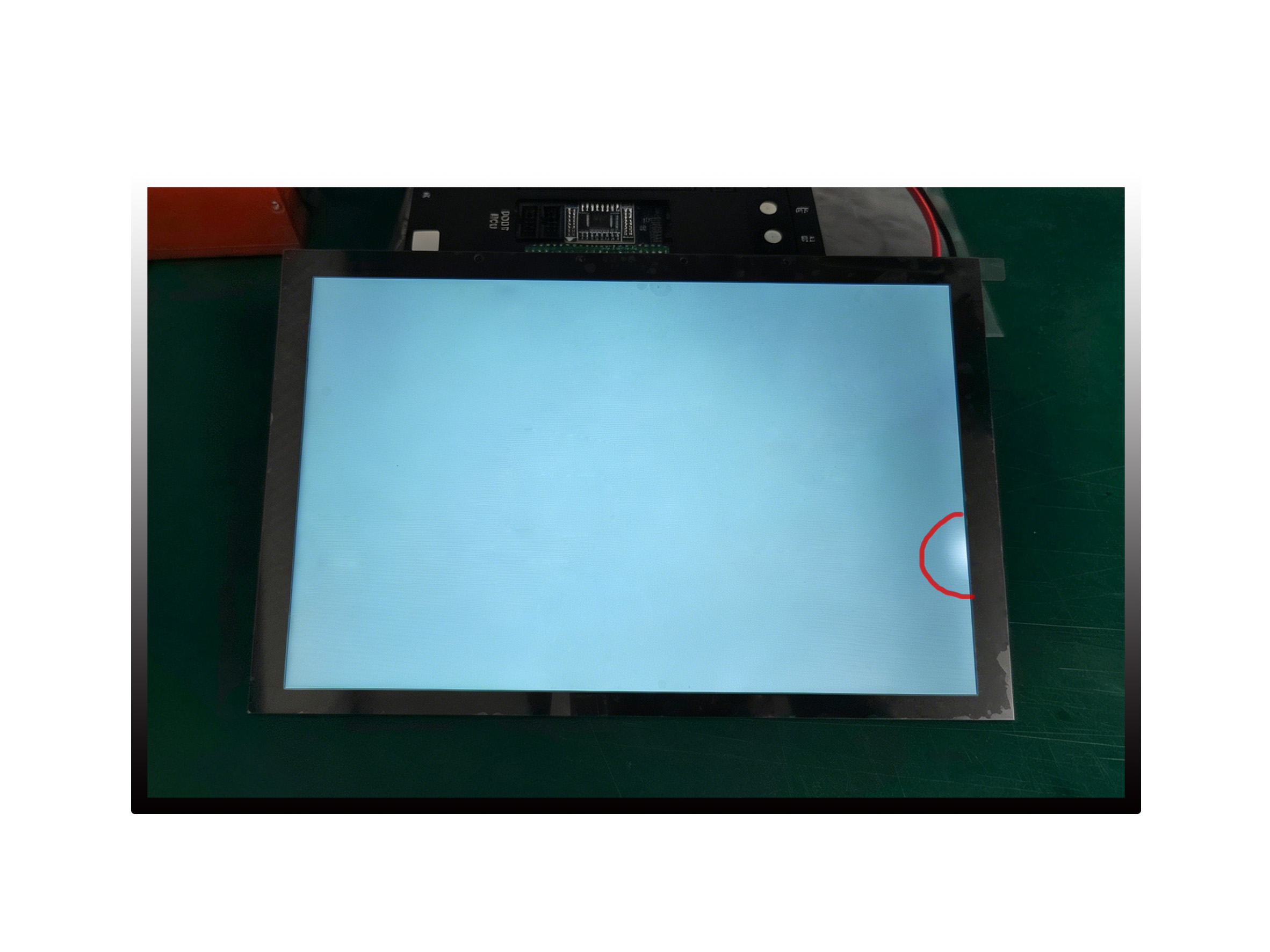
LCD screen bleeding happens when light from the internal backlight escapes through gaps around the edges and corners of an LCD panel. Because all LCD panels rely on an internal backlight, complete elimination of visible edge light leakage remains challenging in mass-produced LCD products.
This issue is most obvious under three conditions:
- Displaying a full pure black image
- Using the screen in a completely dark room
- Running the panel at maximum brightness
Common Symptoms and What Screen Bleeding Looks Lik
- Bright glowing corners on dark backgrounds
- Visible light leakage around display edges
- Uneven screen brightness or brightness patches
- Bright spots caused by uneven backlight distribution
Screen bleeding can occur on all mainstream LCD products, including consumer laptops, desktop monitors, IPS panels, industrial TFT screens, automotive displays and medical monitors.
Is LCD Screen Bleeding Normal?
Slight LCD screen bleeding is normal for standard LCD and IPS displays.
An LCD backlight system consists of LEDs, light guide plates, optical films, polarizers and LCD glass. These components are assembled mechanically, so tiny gaps around edges will inevitably cause minor light leakage.
A display can be confirmed as defective only if it meets any of the following conditions:
- Obvious bright spots appear in the active viewing area (AA)
- Light leakage interferes with daily use
- Bleeding becomes significantly worse as time passes
- Screen brightness uniformity fails to meet basic requirements
LCD Screen Bleeding on Laptops, Monitors and Industrial LCD Displays
LCD screen bleeding is commonly observed on laptops, desktop monitors and other LCD-based display systems, especially when displaying black or dark images in low-light environments.
Laptop Screen Bleeding
Laptop screen bleeding is commonly noticed when displaying black images in dark environments.
Because laptop displays are designed with lightweight and thin structures, minor corner glow or edge light leakage may be visible during low-light viewing.
For normal office use, slight leakage that only appears during dark-room testing is usually acceptable. However, noticeable bright areas that affect image quality or daily viewing experience may indicate a display quality issue
LCD Monitor Bleeding
LCD monitor bleeding is often observed around screen edges or corners, especially when displaying dark backgrounds.
Large monitors, gaming displays and high-brightness panels may make uneven backlight distribution more noticeable.
For professional monitors, brightness uniformity and visual consistency are important evaluation factors. Severe bleeding that affects image accuracy or user experience may require display inspection or replacement.
Industrial LCD Display Bleeding
For industrial LCD displays, backlight bleeding control is more critical because these displays are used in demanding environments such as automotive systems, medical equipment and industrial HMI applications.
Industrial customers usually require stable brightness uniformity, long-term reliability and consistent optical performance.
LCD manufacturers improve bleeding performance through optimized backlight design, optical bonding processes, mechanical structure control and reliability testing.
LCD Screen Bleeding vs IPS Glow (Key Differences)
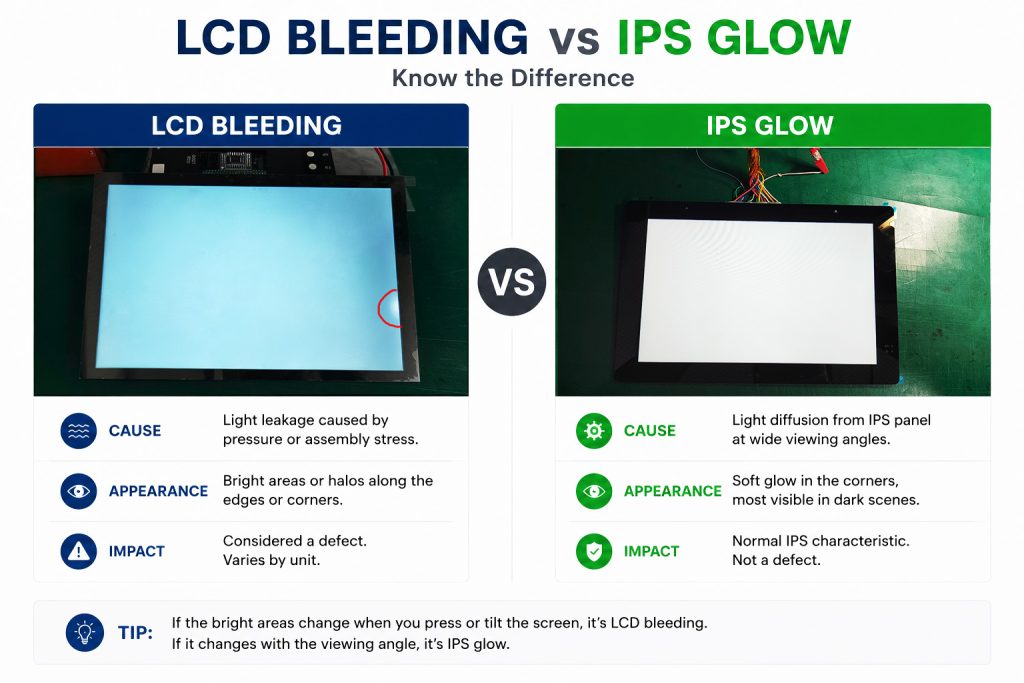
Most users confuse IPS glow with LCD screen bleeding because both appear as bright areas in dark environments. However, they have different causes and characteristics. Understanding the difference helps users identify whether the display behavior is a normal IPS panel feature or a potential backlight quality issue.
|
Defect |
Cause |
Appearance |
|
Bleeding |
Light leakage |
Bright corners |
|
IPS Glow |
IPS characteristic |
Angle dependent glow |
|
Dead Pixel |
Pixel failure |
Black dot |
|
Bright Pixel |
Pixel failure |
White dot |
|
Mura |
Pressure or optical issue |
Cloudy area |
What Causes LCD Screen Bleeding?
Multiple factors lead to backlight bleeding, which can be divided into design, assembly, material and environmental categories.
Structural Design Limitations
LCD modules are stacked with multiple optical layers. Even micro gaps between layers will let backlight leak out from panel edges. This is an inherent limitation of LCD structure.
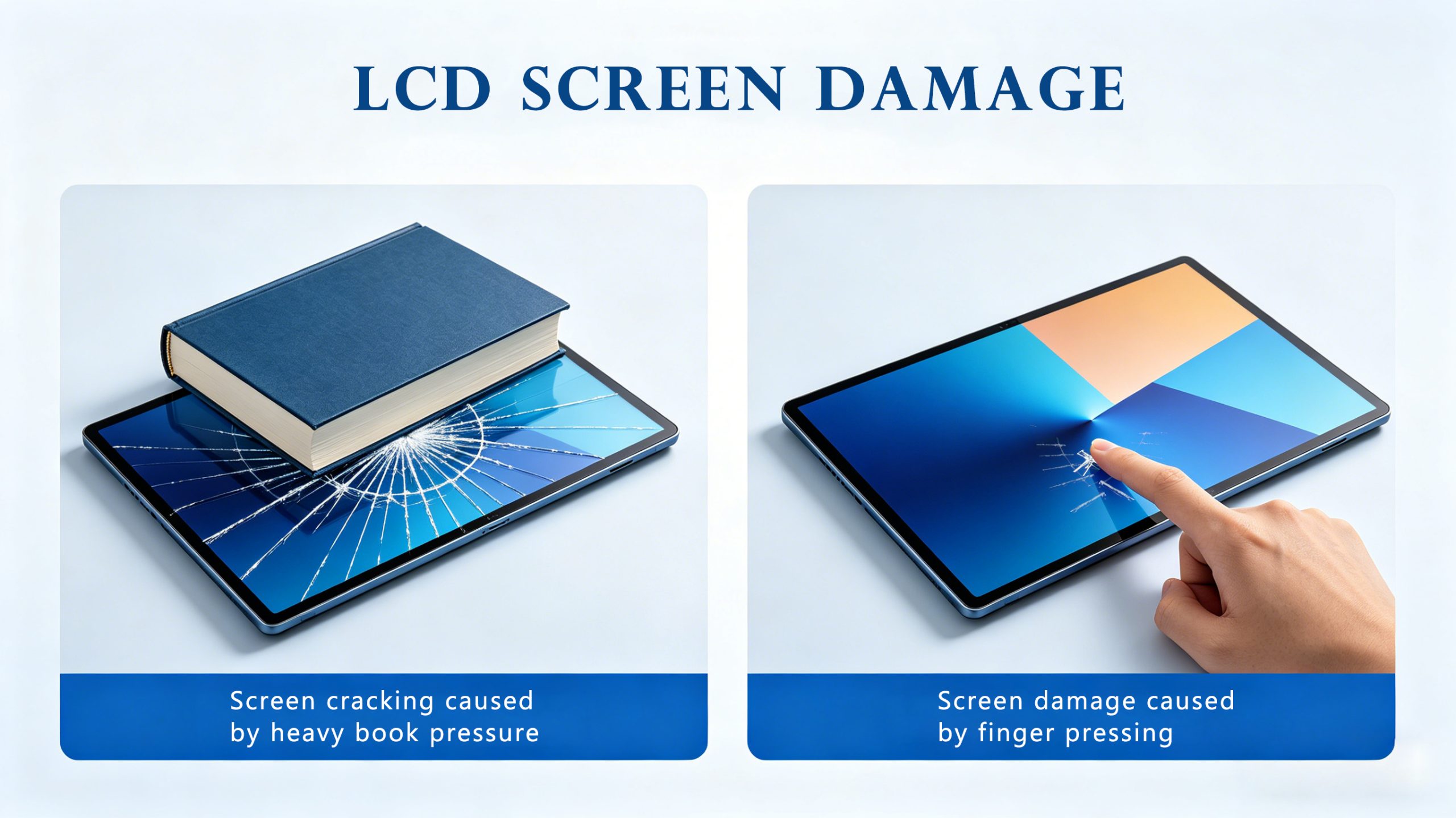
Excessive Mechanical Pressure (Most Common Cause)
Mechanical stress is one of the leading causes of LCD screen bleeding. The pressure may originate from:
- Tight display housings or bezels
- Fixed mounting brackets
- Over-compressed frame structures
- Improper assembly operations
- Uneven mechanical support
In severe cases, excessive pressure may also cause pressure mura, resulting in localized brightness or color non-uniformity in addition to light leakage.
Optical Film Misalignment
Small position errors of optical films during production will form visible light leakage points on the panel.
Material Aging
Long-term operation can cause component aging, including adhesive degradation, seal failure, and optical film deformation, which may worsen light leakage and affect overall optical performance.
Although LCD screen bleeding and LCD yellowing are both related to optical degradation, they represent different failure mechanisms. Bleeding mainly appears as uneven brightness or edge light leakage, while LCD yellowing is associated with aging of optical components such as polarizers, adhesives, and backlight materials.
For more details, refer to our guide on LCD yellowing causes and prevention.
Environmental Stress
Harsh working environments accelerate screen bleeding, including high temperature, repeated thermal cycling, continuous vibration and mechanical shock.
Does LCD Screen Bleeding Get Worse Over Time?
Can Bleeding Get Worse?
In some cases, LCD screen bleeding may become more noticeable over time. Thermal expansion and contraction, aging adhesives, long-term vibration and continuous high-brightness operation may affect the stability of the backlight structure and increase visible light leakage.
This situation is particularly prominent on industrial equipment, automotive screens and outdoor displays, so reliability testing is essential during product development.
However, LCD screen bleeding usually does not suddenly spread like a pixel failure. It mainly becomes more noticeable when the panel structure, optical layers or backlight components are affected over long-term operation.
Can Pressure-Related Bleeding Improve?
In some cases, mild bleeding caused by bezel pressure or assembly stress will become less noticeable after long-term use.
Repeated thermal expansion and contraction during daily operation can gradually release local mechanical stress inside the panel, reducing edge and corner light leakage. Many displays show improved corner bleeding after days or weeks of use.
|
Note: This improvement only applies to pressure-related bleeding. If the leakage is caused by optical misalignment, structural deformation or material aging, it will not get better and may deteriorate further. We do not recommend relying on self-repair to judge display quality. |
If dark irregular shadow areas appear on the display apart from edge bleeding, you need to distinguish them from lcd pressure damage. Pressure marks will not disappear when adjusting backlight brightness, unlike LCD screen bleeding defects.
How to Test LCD Screen Bleeding
Testing LCD screen bleeding helps determine whether brightness variations are normal panel characteristics or potential display quality issues. Different testing methods are used depending on whether the display is evaluated by end users, quality engineers or LCD manufacturers
We divide testing methods into daily visual inspection and professional instrumental measurement, which are widely used for incoming quality check and mass production testing.
Basic Visual Inspection (For Daily Users)
Basic Visual Inspection: Users can perform a quick check by setting the display to a pure black image at maximum brightness in a dark room to observe any visible edge or corner leakage.
- Display a pure black image
- Test in a dark room
- Adjust brightness levels
- Check corner and edge leakage
Minor edge leakage may be acceptable if it does not affect normal viewing experience.
Professional Instrument Testing (For Manufacturers)
Industrial and commercial LCD manufacturers use professional optical measurement equipment for quantitative evaluation of backlight uniformity and light leakage:
- Luminance meters
- Imaging colorimeters
- Brightness uniformity measurement systems
Reliability Verification (For Industrial & Automotive Products)
For displays used in special scenarios, additional environmental tests are required: – Thermal cycling test – High temperature aging test – Low temperature storage test – Vibration and shock test
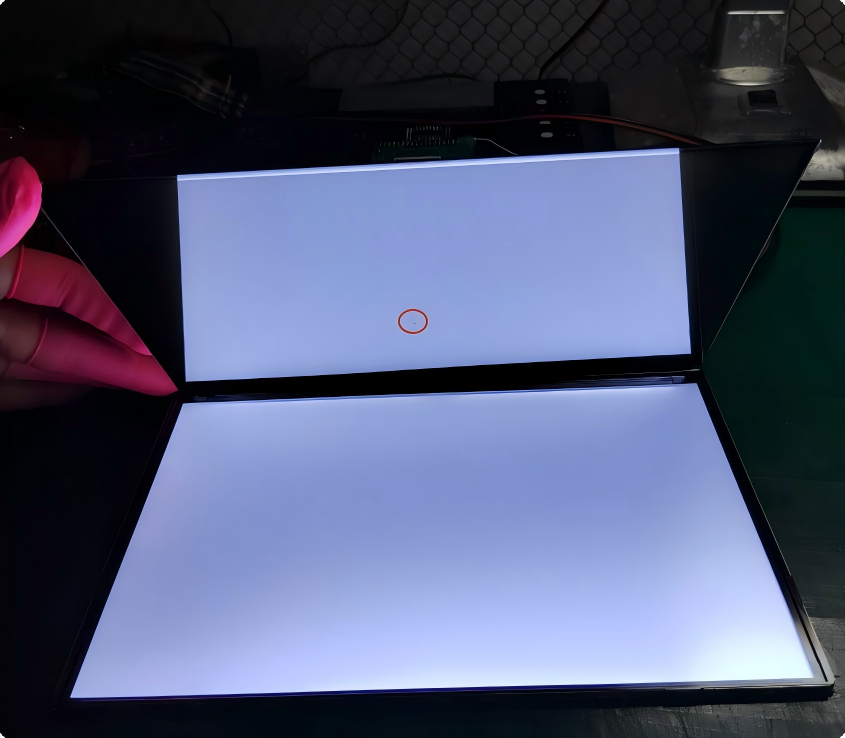
| When inspecting IPS LCD backlight bleeding, inspectors often mix up light leakage fog with white spots on lcd screen. White spots come from backlight particle extrusion, while LCD screen bleeding is caused by frame clearance and edge light leakage. |
Industry Acceptance Standards for IPS Display Bleeding
There is no single global standard specially for LCD screen bleeding. The industry mainly refers to IEC 61747, ISO 9241 and VESA FPDM to evaluate brightness uniformity and optical performance. We sort out unified acceptance criteria for consumer, industrial, automotive and medical IPS displays, plus the brightness uniformity calculation rule.
For industrial and automotive projects, environmental reliability requirements are often verified according to IEC 60068 testing methodologies.
Typical Brightness Uniformity Recommendations
While there is no universal industry standard specifically defining acceptable LCD screen bleeding levels, brightness uniformity is commonly used as an important evaluation indicator.
Professional LCD manufacturers evaluate bleeding performance through brightness uniformity testing, optical measurement and reliability verification.
Detailed Rules for Special Displays
Consumer Laptops & Monitors (Recommended Uniformity: ≥75%)
✅ Acceptable: Minor edge or corner bleeding that is only visible on a pure black screen in a dark room; has no impact on daily tasks or web browsing.
❌ Reject: Severe bleeding that creates a constant halo around the taskbar or screen edges during normal office use; severe brightness non-uniformity.
Industrial IPS Displays (Recommended Uniformity: ≥80%)
✅ Acceptable: Bleeding only visible in dark-room black screen test; no impact on normal use; no bright spots in active area
❌ Reject: Light leakage inside active area; local bright spots; obvious brightness inconsistency
Automotive IPS Displays (Recommended Uniformity: ≥85%)
✅ Acceptable: No bleeding visible during driving; minor corner glow only in extreme dark environment; stable after vibration & thermal tests
❌ Reject: Leakage affecting dashboard readability; distracting bright spots; new leakage after environmental tests
Medical IPS Displays (Recommended Uniformity: ≥90%)
Medical displays require the strictest brightness uniformity for diagnostic work.
✅ Acceptable: Extremely even brightness; no center-area leakage or pressure mura
❌ Reject: Leakage causing grayscale distortion; brightness issues affecting diagnosis
Brightness Uniformity Formula

Example Calculation:
- Max Luminance: 1000 nits
- Min Luminance: 850 nits
Uniformity = 85%
Result: 85% Uniformity perfectly complies with the rigorous requirements of Automotive IPS Displays.
How Brightness Uniformity Is Measured
Brightness uniformity is typically evaluated using a 5-point or 9-point measurement method. Luminance values are measured at multiple locations across the display surface, and the ratio between the minimum and maximum brightness values is calculated.
A typical 9-point measurement layout is shown below:
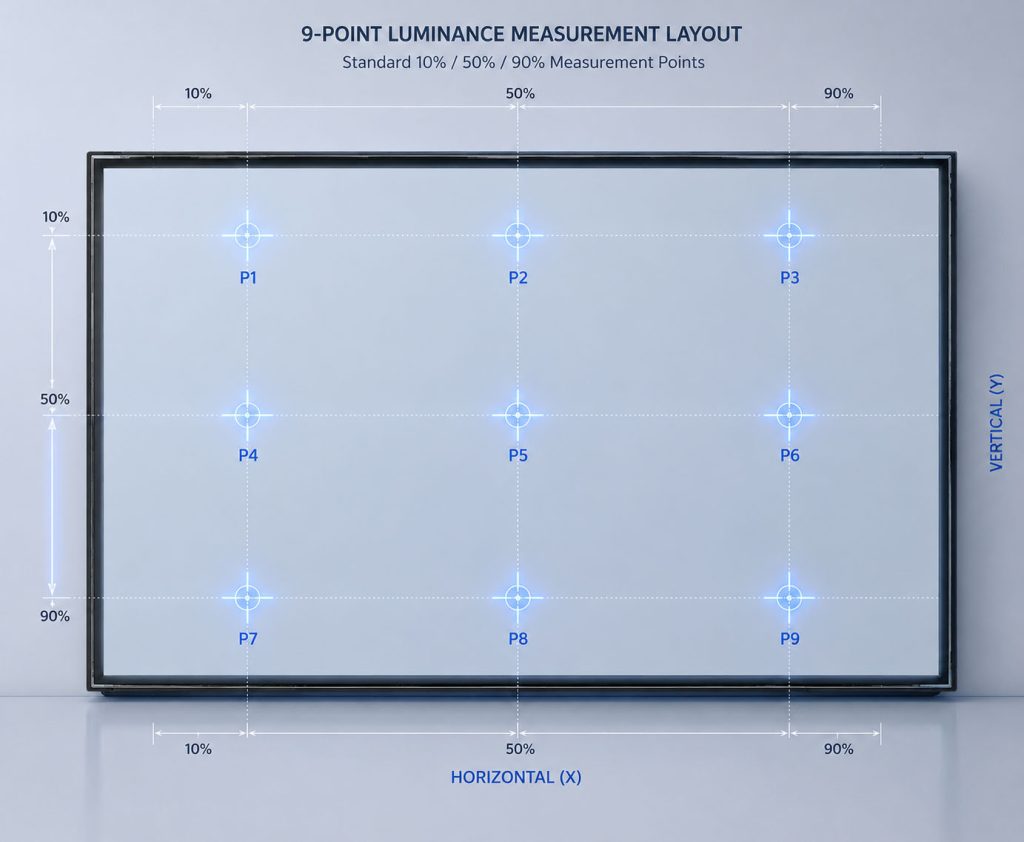
P5 represents the center measurement point, while the remaining positions evaluate brightness consistency across the display area.
For industrial, automotive, and medical displays, 9-point measurement is commonly used to achieve more accurate brightness uniformity evaluation.
How to Fix LCD Screen Bleeding: Consumer and Manufacturer Solutions
LCD screen bleeding solutions depend on the root cause and severity of the issue.
Minor light leakage may be reduced through display adjustment or mechanical optimization. However, severe bleeding caused by structural deformation, optical layer issues or backlight defects usually requires professional evaluation or LCD module replacement.
For consumers, possible approaches include:
- Reducing screen brightness to make light leakage less noticeable
- Checking whether the issue changes with viewing angle
- Avoiding excessive pressure on the display surface
- Requesting replacement if the leakage affects normal usage
For LCD manufacturers, preventing and reducing screen bleeding requires engineering optimization throughout the display development process.
Engineering solutions include:
- Optical bonding to improve structural stability and reduce internal gaps
- Optimized bezel and frame design to minimize mechanical stress
- Improved backlight structure and light guide plate design
- Brightness uniformity inspection during quality control
- Reliability testing under temperature cycling, vibration and mechanical stress conditions
For severe bleeding caused by panel structural defects, optical layer misalignment or backlight damage, LCD module replacement is usually the most reliable solution. Since LCD modules contain precisely aligned optical components, field repair is generally not recommended. For industrial and automotive applications, professional evaluation and replacement by the original manufacturer can ensure long-term reliability.
How CDTech Minimizes LCD Screen Bleeding
CDTech specializes in TFT LCD modules from 1.5 to 15.6 inches, with extensive experience in industrial, automotive, medical, and outdoor display applications, particularly in 7-15.6 inch IPS TFT displays.
To reduce LCD screen bleeding and improve brightness uniformity, we combine:
- Optical stack simulation and verification
- Precision bezel and frame design
- Strict assembly tolerance control
- AOI (Automated Optical Inspection) throughout production
- 100% brightness uniformity testing
- Thermal cycling and vibration reliability validation
Because excessive mechanical stress is one of the most common causes of backlight bleeding, our engineering team optimizes structural support, pressure distribution, and assembly processes to minimize pressure-induced light leakage and maintain long-term optical stability.
For industrial, outdoor, and vehicle-mounted applications, additional structural reinforcement and project-specific reliability verification can be implemented. Where required, impact resistance validation according to applicable IK protection standards can also be arranged.
As a result, CDTech display solutions deliver reliable visual performance for industrial equipment, automotive systems, medical devices, and other mission-critical applications.
Partner with CDTech for Reliable Display Solutions
Reducing backlight bleed requires rigorous engineering from optical simulation to automated testing. CDTech provides custom TFT LCD modules (1.5″ to 15.6″) tailored for mission-critical industrial, medical, and automotive applications.
[Contact Our Engineering Team Today] for a free LCD bleeding evaluation and customized display recommendation.
Frequently Asked Questions
Q1: Can LCD screen bleeding get worse over time?
A1: Yes. Material aging, vibration and temperature changes will gradually aggravate light leakage.
Q2: Can screen bleeding improve naturally?
A2: Mild bleeding caused by bezel pressure may fade as mechanical stress releases. Bleeding from structural defects or optical errors will not improve.
Q3: Is IPS glow the same as screen bleeding?
A3: No. IPS glow is a natural panel feature, while screen bleeding is caused by assembly or structural problems.
Q4: Can LCD screen bleeding be fixed completely?
A4: Mild bleeding can be reduced by adjusting pressure and reassembly. Severe structural bleeding requires panel replacement.
Q5: Does OLED have backlight bleeding?
A5: No. OLED screens have no backlight, so traditional backlight bleeding does not exist.
Q6: Can OCA bonding reduce screen bleeding?
A6: OCA bonding improves optical uniformity, but cannot eliminate bleeding caused by panel structure.
Q7: Is screen bleeding covered under warranty?
A7: Warranty policies differ among manufacturers and product application standards.
Q8: Does higher brightness increase backlight bleeding?
A8: High-brightness displays do not directly cause LCD screen bleeding. However, stronger backlight output can make existing light leakage more noticeable, especially when displaying dark content in low-light environments.
Q9: Can vibration cause LCD screen bleeding?
A9: Yes. Long-term vibration and mechanical shock may increase assembly stress, material fatigue, or structural deformation, potentially worsening existing screen bleeding. This is why vibration testing is important for industrial and automotive display applications.
Q10: Can pressure mura be mistaken for screen bleeding?
A10: Yes. Pressure mura and screen bleeding may appear similar,but pressure mura affects brightness uniformity inside the display area, while bleeding is usually located at edges or corners.