

Stylus Pen Capacitive Touch Screen: Key Benefits for Professionals
 2026-10-01
  11:00
11:00 

Professionals need more from a touch display than a bright picture and a large button. A stylus pen capacitive touch screen can support annotation, inspection, diagram work and controlled data entry when the pen, touch sensor, cover glass, controller and host software are specified together. The practical choice depends on the application and operating environment, not on the word “stylus” alone.
What Is a Stylus Pen Capacitive Touch Screen?
A stylus pen capacitive touch screen detects electrical changes created by a compatible finger, passive stylus or active stylus. A passive stylus acts like a conductive extension of a finger, while an active stylus uses built-in electronics and may support a finer tip or additional input features. Compatibility still depends on the touch controller, firmware, cover glass and operating system. For buyers, stylus performance should therefore be evaluated as part of the complete touch and display stack rather than as a feature of the glass alone.
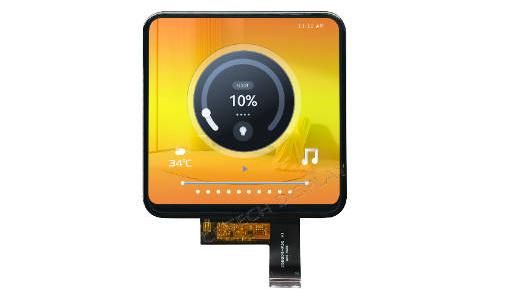
Key Factors That Affect Stylus Performance
Stylus performance becomes more demanding when the user needs a narrow and repeatable contact point. The specification should define the stylus type, tip diameter, target accuracy, writing angle, palm-rejection requirement and whether operation with gloves or water is required. Cover glass thickness, sensor pattern, controller selection and firmware tuning can all influence tracking accuracy and responsiveness. These parameters should be evaluated together with the intended application rather than specified independently.
Benefits of Stylus Input in Professional Applications
A stylus can make small targets easier to select, keep a hand from covering a measurement and let a technician mark a drawing without a separate input device. These benefits depend on latency, tip tracking, application calibration, surface friction and readable display content. A sample test with the intended stylus and application is more useful than a generic stylus demonstration.
Which Display Surface Works Best for Stylus Interaction?
The display panel and touch layer should be evaluated together because stylus usability depends on more than the display technology itself. Cover glass thickness, optical bonding, surface treatment, touch-sensor design and controller tuning can affect visibility, friction and pen tracking. Buyers should therefore evaluate the complete display and touch stack under the intended viewing and operating conditions.
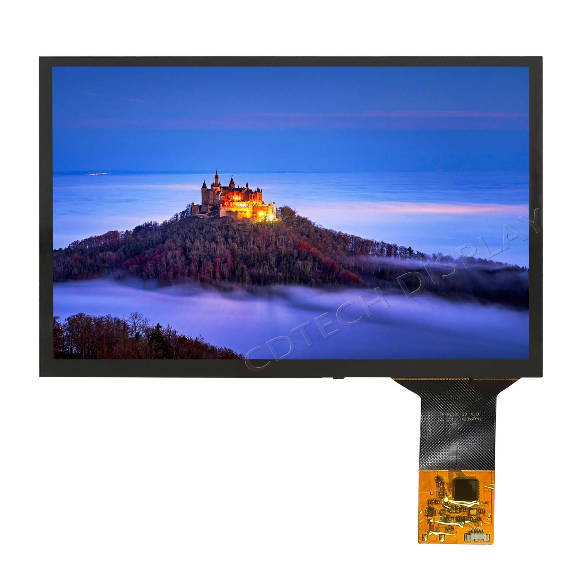
What Is the Difference Between Resistive and Capacitive Touchscreen Input?
The resistive vs. capacitive touchscreen decision starts with the required input method and operating environment. Resistive touch responds to pressure and can suit deliberate single-point input with a simple stylus. Capacitive touch supports light touch, multi-touch gestures and compatible passive or active styluses when the system is designed for them. Water, glove material, cover glass thickness, electromagnetic noise and required accuracy can all affect the choice. Bonding, sensor design and controller tuning should therefore be considered together.
Where Do Custom Stylus Touch Displays Add Value?
Custom hardware becomes valuable when a standard touch module cannot meet the required mechanics, stylus performance or operating conditions. Applications such as industrial instruments, medical interfaces and field terminals may require a specific cover-glass shape or thickness, bonding method, stylus type, touch sensitivity or environmental performance. A custom capacitive touch solution should therefore define the required engineering changes and validation conditions clearly.
Can a Capacitive Touch Bar Control an Appliance?
A capacitive touch bar can place status information and controls along a narrow appliance surface. For example, fully automatic temperature control with capacitive touch may show a set point, timer and operating state while the user taps or swipes. Moisture, oils, cleaning agents and gloved operation belong in the test plan. The bar shape helps mechanical integration but does not prove durability by itself.
How to Specify a Custom Stylus Capacitive Touch Screen?
An RFQ should describe the complete display and touch module rather than only requesting a “custom capacitive touch screen.” Include the display size, active area, outline, resolution and luminance, together with the cover-glass shape, thickness and surface treatment.
For stylus input, specify whether a passive or active stylus is required, the expected tip size, target accuracy, writing angle and palm-rejection requirement. The RFQ should also state whether the screen must support gloves, water or wet-finger operation.
Touch-controller requirements, display and touch interfaces, FPC direction, bonding method, operating temperature and host-system constraints should also be defined. For projects requiring customization, drawings and sample validation help confirm that the selected stylus, cover glass, sensor and controller work together in the final assembly.
Which Mechanical and Optical Fields Control Pen Usability?
Stylus accuracy and tracking can be affected by the distance from tip to sensor, cover thickness, coatings, optical bonding, active area and brightness. Anti-glare, anti-reflection and anti-fingerprint treatments can change clarity and friction. A capacitive touch screen custom request should include drawings and test conditions rather than only a diagonal size.
.jpg)
How Do Interface, EMI and Temperature Requirements Affect Integration?
The touch controller should be selected and tuned for the intended stylus, cover glass, sensor and operating environment. USB or IIC may carry touch data, while LVDS, RGB, MIPI, HDMI or another interface carries display data, depending on the module. EMI shielding, connector position and FPC routing can affect touch stability and stylus tracking. Calibration, firmware revision control and environmental testing should be confirmed so that a stylus that works on a bench also performs reliably inside the finished product.
How Can CDTech Support a Professional Stylus Display Program?
CDTech can review a stylus pen capacitive touch screen brief around the LCD, PCAP sensor, cover glass, stylus type, touch controller, interface and enclosure. Our verified customization scope includes cover-glass shape, thickness and material, active or passive stylus support, glove and waterproof touch options, AG/AF/AR/3A/UV treatments, custom CTP FPC, bonding and USB or IIC interfaces. Stylus compatibility and accuracy remain project-specific and should be confirmed with drawings, controller settings and representative samples.
What Can CDTech Customize Around a Stylus-Ready Display?
Our custom capacitive touch display route can combine a TFT-LCD module with PCAP, optical or air bonding, a selected touch controller, a defined FPC and a cover lens suited to the enclosure. Verified 10.1-inch IPS capacitive references include model-specific resolution, brightness, LVDS display interfaces and IIC or USB touch interfaces. Stylus type, cover-glass design, controller tuning and environmental requirements can then be reviewed according to the application.
Which Evidence Should a Buyer Send CDTech?
Send the mechanical drawing, active area, intended stylus model or stylus type, required accuracy, cover-glass specifications, target luminance, viewing distance, display and touch interfaces, operating range, EMC constraints, test content and expected quantity. If glove or water operation is required, include the glove material, thickness and representative wet-use conditions. CDTech can then identify standard fields, customization fields and items that require controller tuning or sample validation.
FAQ
Q: How Do I Know Whether a Stylus Is Compatible With a Capacitive Touch Screen?
A: Compatibility depends on the stylus type, touch sensor, controller, firmware, cover-glass thickness and operating system. A passive stylus may work as a conductive finger substitute, while an active stylus usually requires specific controller and protocol support. Final compatibility should be confirmed with the intended stylus and a representative display sample.
Q: Is Resistive or Capacitive Touch Better for Stylus Input?
A: The choice depends on the input method and operating environment. Resistive touch responds to pressure and can work with simple styluses, while capacitive touch can support light touch, gestures and compatible passive or active styluses. Glove use, water exposure, cover-glass thickness, accuracy and multi-touch requirements should be considered before selection.
Q: What Affects Stylus Accuracy on a Capacitive Touch Screen?
A: Stylus accuracy can be affected by the stylus tip, cover-glass thickness, sensor design, controller tuning, bonding method, writing angle and electromagnetic noise. For applications that require precise selection or writing, target accuracy should be defined in the specification and verified with samples.
Q: What Can Be Customized for a Stylus Capacitive Touch Screen?
A: Common customization items include cover-glass size, shape and thickness, surface treatments, passive or active stylus support, touch-controller tuning, glove and water operation, bonding, CTP FPC design and USB or IIC touch interfaces. The final scope depends on the selected display, mechanical design and validation requirements.
Post Search
Related Articles
-

Capacitive vs Resistive Touch Screen Car Stereo: Which Is Right for You?
-

TN LCD vs IPS LCD: How to Choose the Right Display for You
-

Capacitive Touch Panel or Resistive: Which Suits Your Needs?
-

Why Choose an IPS LCD Panel for Your Next Screen Purchase?
-

CDTECH to Showcase Cutting-Edge Display Solutions at SID 2025
-

Comparing Different Types of Displays in Cars: A Detailed Overview
-

White Spots on LCD Screen: Causes, Fixes & Industrial Solutions (2026 Guide)